
Deploy Supabase | Open Source Firebase Alternative
Self Host Supabase. Auth, APIs, Functions, Subs, Vector embeddings & more

Just deployed

Just deployed
/var/lib/postgresql/data
Just deployed
Just deployed
Just deployed
/var/lib/storage

Just deployed

functions
Just deployed
realtime
Just deployed

Just deployed
imgproxy
Just deployed

analytics
Just deployed
Just deployed
Deploy and Host Supabase on Railway

Supabase is an open-source Firebase alternative that gives you a hosted PostgreSQL database, authentication, file storage, real-time subscriptions, auto-generated REST and GraphQL APIs, and edge functions — all behind a single API gateway. Self-host Supabase on Railway when you want the full Firebase developer experience without vendor lock-in, and the freedom to run on your own infrastructure with a single click.
This Railway template deploys the complete twelve-service Supabase stack — postgres, kong (API gateway), auth (GoTrue), rest (PostgREST), realtime, storage, imgproxy, meta (postgres-meta), functions (edge-runtime), analytics (Logflare), studio (the dashboard), and supavisor (connection pooler) — pre-wired with cross-service references, JWT keys, and a public domain pointing at Kong. The Vector log shipper is intentionally omitted because it requires docker.sock access that Railway does not expose; Railway's own logging serves the same purpose.
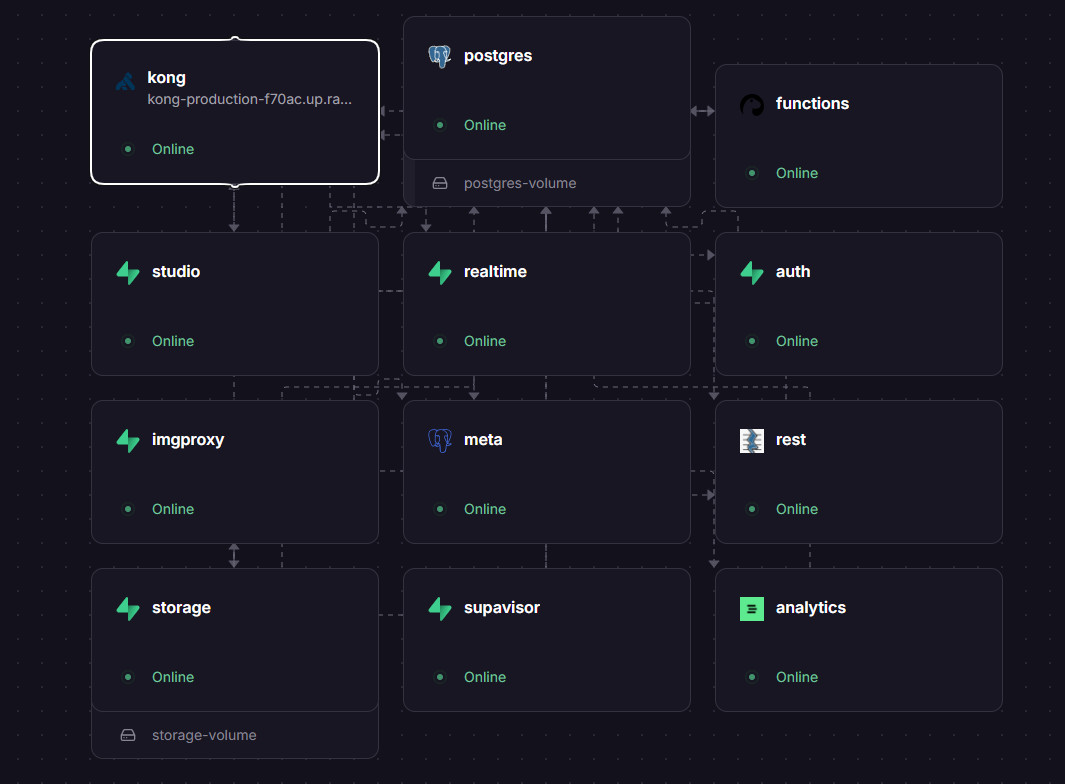
Getting Started with Supabase on Railway
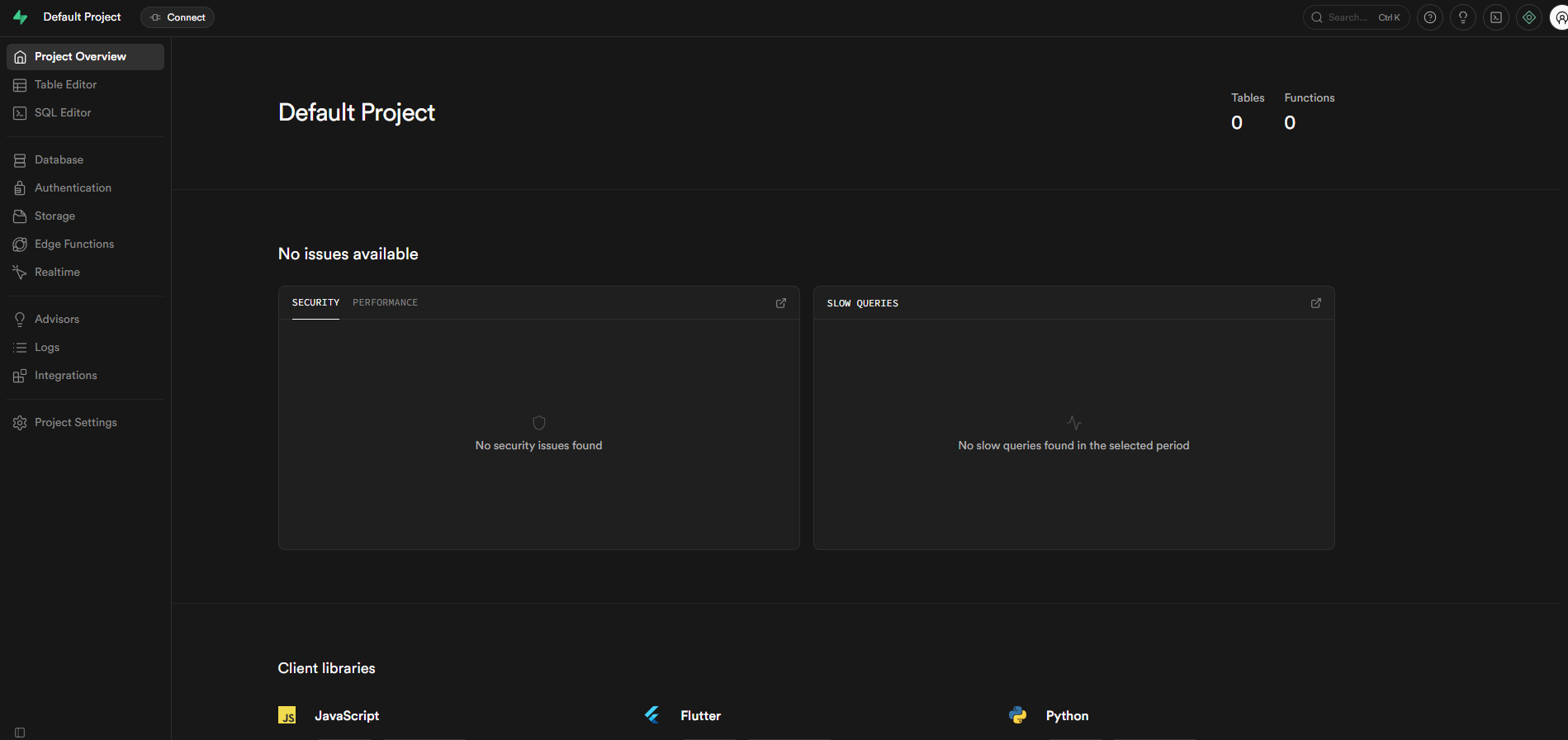
After the deployment finishes, visit the public URL Railway assigned to the kong service. You'll be prompted for the dashboard basic-auth credentials defined by DASHBOARD_USERNAME and DASHBOARD_PASSWORD — log in to land on Supabase Studio's project page. From there you can create tables in the SQL editor, generate API keys, configure Row Level Security policies, set up email or social auth providers, upload files into storage buckets, write edge functions, and wire your client SDKs against the same Kong public URL using the auto-generated ANON_KEY and SERVICE_ROLE_KEY. Visit Project Settings → API to copy the keys into your application code.
About Hosting Supabase
Supabase wraps a vanilla PostgreSQL 15 database with a constellation of microservices that turn it into a complete backend-as-a-service. Every feature is just SQL underneath, which means you keep the predictability and tooling of a relational database while getting Firebase-style ergonomics on top.
Key features:
- PostgreSQL 15 with
pgvector,pg_graphql,pgsodium,pg_net,pgjwtextensions for AI embeddings, GraphQL, encryption, HTTP calls, and JWT minting - Email and OAuth authentication via GoTrue, including Apple, Google, GitHub, Discord, Slack, and SAML SSO
- Auto-generated REST and GraphQL APIs from your schema via PostgREST
- Real-time subscriptions over WebSocket via Phoenix
- S3-compatible object storage with on-the-fly image transformations
- Deno-based edge functions for server-side logic
- Built-in Studio UI for table editing, SQL queries, log inspection, and storage management
Why Deploy Supabase on Railway
Run the entire Supabase stack on Railway's infrastructure with a single deploy:
- One-click provisioning of all 12 services with cross-service references already wired
- Automatic public HTTPS domain on the Kong gateway with target-port routing
- Pay only for the compute and storage you actually use, no per-row pricing surprises
Common Use Cases
- Mobile and web app backends that need auth, database, and storage in one place
- Migrating off Firebase to keep relational schemas, RLS, and SQL ergonomics
- Internal tools that benefit from auto-generated REST APIs and Studio's table editor
- AI applications using
pgvectorfor semantic search and Retrieval Augmented Generation
Dependencies for Self-Hosting Supabase
The template provisions the following services from their official Docker images and three Strategy D custom images:
postgres—praveen-ks-2001/supabase-postgres-railway(extendssupabase/postgres:15.8.1.085with init SQL scripts)kong—praveen-ks-2001/supabase-kong-railway(extendskong/kong:3.9.1with declarative config and entrypoint)supavisor—praveen-ks-2001/supabase-supavisor-railway(extendssupabase/supavisor:2.7.4with pooler tenant seed)auth—supabase/gotrue:v2.186.0rest—postgrest/postgrest:v14.8realtime—supabase/realtime:v2.76.5storage—supabase/storage-api:v1.48.26imgproxy—darthsim/imgproxy:v3.30.1meta—supabase/postgres-meta:v0.96.3functions—supabase/edge-runtime:v1.71.2analytics—supabase/logflare:1.36.1studio—supabase/studio:2026.04.27-sha-5f60601
Environment Variables Reference
| Variable | Service | Purpose |
|---|---|---|
JWT_SECRET | shared | HS256 key that signs ANON_KEY and SERVICE_ROLE_KEY |
ANON_KEY | shared | Public client API key (anon role JWT) |
SERVICE_ROLE_KEY | shared | Server-side API key with full access |
DASHBOARD_USERNAME / DASHBOARD_PASSWORD | kong/studio | Basic auth for the dashboard |
POSTGRES_PASSWORD | postgres | Master DB password — referenced by every consumer |
POOLER_TENANT_ID | supavisor | Logical tenant name for the connection pooler |
Deployment Dependencies
- Source: supabase/supabase (docker self-host)
- Docs: supabase.com/docs/guides/self-hosting
Hardware Requirements for Self-Hosting Supabase on Railway
| Resource | Minimum | Recommended |
|---|---|---|
| CPU | 2 vCPU shared | 4 vCPU |
| RAM | 4 GB across services | 6–8 GB |
| Storage | 5 GB on postgres volume + 5 GB on storage volume | 20+ GB each |
| Runtime | 12 services on a single Railway project | same |
How to Self-Host Supabase
The reference deployment lives in three custom repositories that the Railway template builds directly from GitHub. The Postgres service uses a wrapper start command to handle Railway's volume layout:
/bin/bash -c "mkdir -p /var/lib/postgresql/data/pgdata && chown -R postgres:postgres /var/lib/postgresql/data && export PGDATA=/var/lib/postgresql/data/pgdata && exec docker-entrypoint.sh postgres -c config_file=/etc/postgresql/postgresql.conf -c data_directory=/var/lib/postgresql/data/pgdata -c log_min_messages=fatal"
Kong is published to the public domain by setting its target port to 8000 — every other service stays on *.railway.internal and is reached only through Kong's declarative routes:
SUPABASE_AUTH_HOST=${{auth.RAILWAY_PRIVATE_DOMAIN}}
SUPABASE_REST_HOST=${{rest.RAILWAY_PRIVATE_DOMAIN}}
SUPABASE_STORAGE_HOST=${{storage.RAILWAY_PRIVATE_DOMAIN}}
KONG_DECLARATIVE_CONFIG=/tmp/kong.yml
How Much Does Supabase Cost to Self-Host on Railway?
Supabase itself is open source under Apache 2.0 — there are no licensing fees for any of the twelve services. On Railway you pay only for the compute, RAM, and storage your services consume. Expect roughly $20–40/month for a low-traffic deployment on the Pro plan, scaling with the size of your postgres and storage volumes. Supabase Cloud's hosted Pro plan starts at $25/month with usage-based add-ons; self-hosting on Railway is comparable for small workloads and far cheaper as data and traffic grow.
FAQ
What is Supabase and why self-host it? Supabase is an open-source Firebase alternative built on PostgreSQL. Self-hosting on Railway gives you the full Supabase developer experience (auth, storage, realtime, edge functions, studio) without vendor lock-in, with full control over your database, and predictable infrastructure pricing.
Why does the template include imgproxy, analytics, and meta?
imgproxy powers Storage's on-the-fly image resizing and format conversion. analytics (Logflare) powers Studio's "Logs" tab so you can inspect API and database activity. meta (postgres-meta) is what Studio's table editor uses to introspect and modify your schema.
Why is Vector not included?
Upstream Supabase uses Vector to scrape docker.sock for container logs and ship them to Logflare. Railway does not expose docker.sock, so Vector cannot run. Railway's own log viewer covers the same use case.
Can I use Railway-managed Postgres instead of supabase/postgres?
No. Self-hosted Supabase requires PostgreSQL extensions (pgsodium, pg_graphql, pg_net, pgjwt) that Railway-managed Postgres does not include. The template uses the supabase/postgres image specifically for these extensions.
How do I connect my Supabase JS client to the deployed instance?
Use Kong's public domain as SUPABASE_URL and the ANON_KEY from the deployment as the SUPABASE_ANON_KEY argument to createClient(). Both values are visible in your Railway project variables.
How do I rotate the JWT secret without breaking existing sessions?
Update JWT_SECRET on every service that references it (auth, rest, realtime, storage, functions, studio, supavisor), then redeploy each. All previously-issued tokens become invalid — clients must sign in again. Re-mint ANON_KEY and SERVICE_ROLE_KEY with the new secret using any HS256 JWT signer.
Supabase vs Firebase
| Supabase | Firebase | |
|---|---|---|
| Database | PostgreSQL (relational) | Firestore (NoSQL document) |
| Auth | GoTrue + RLS at DB level | Firebase Auth + security rules |
| Storage | Postgres-backed object store | Cloud Storage |
| Realtime | Postgres logical replication | Native realtime DB |
| Self-hostable | Yes (Apache 2.0) | No |
| Pricing model | Predictable tiers | Pay-per-read |
Supabase wins for relational data, RLS-at-the-database-level security, vector search via pgvector, and self-hosting freedom. Firebase still has the edge for mobile-first apps deeply integrated with the Google ecosystem.
Template Content
functions
supabase/edge-runtime:v1.71.2realtime
supabase/realtime:v2.76.5imgproxy
darthsim/imgproxy:v3.30.1analytics
supabase/logflare:1.36.1

