
Deploy Zulip | Open Source Team Chat, Slack Alternative with Topics
Self-host Zulip. Async chat for distributed teams with 120+ integrations

Redis
Just deployed
/data

PostgreSQL
Just deployed
/var/lib/postgresql/data
Just deployed
/data

Memcached
Just deployed

RabbitMQ
Just deployed
/var/lib/rabbitmq

Deploy and Host Zulip on Railway

Deploy Zulip on Railway to get a production-ready, self-hosted team chat server with topic-based threading that keeps conversations organized at scale. Self-host Zulip with full control over your data, no per-user fees, and the same powerful features used by open-source communities and distributed teams worldwide.
Getting Started with Zulip on Railway
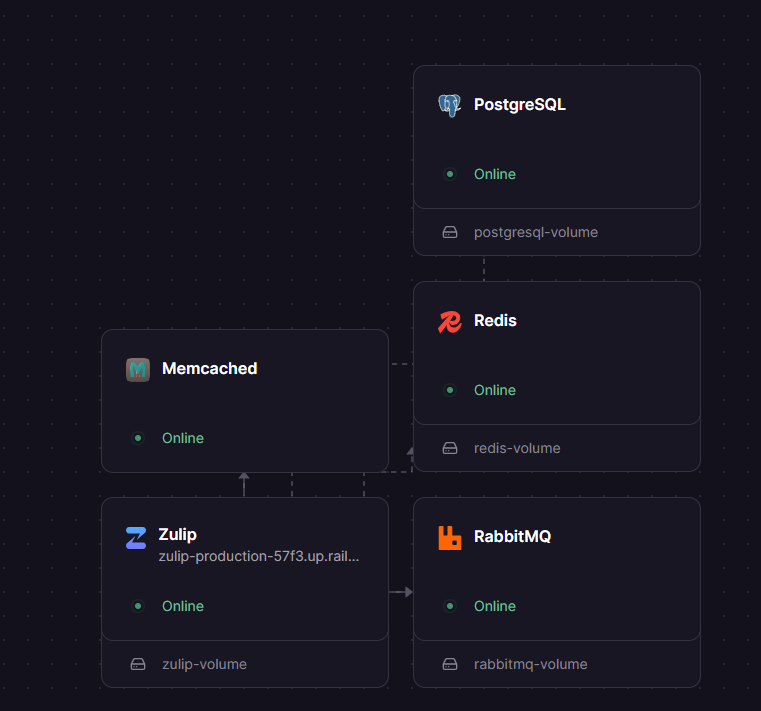
Once the template deploys, all five services start automatically. Zulip runs database migrations on first boot, which takes 1-2 minutes. Before creating your first organization, configure SMTP — set SETTING_EMAIL_HOST_USER, SECRETS_email_password, and SETTING_NOREPLY_EMAIL_ADDRESS on the Zulip service with your SMTP credentials (Gmail app password, SendGrid API key, Mailgun, or Amazon SES). Without SMTP, the email confirmation sent after /new/ signup will never arrive. Once SMTP is live, navigate to /new/ (enabled by default via SETTING_OPEN_REALM_CREATION=True), submit your organization name and email, click the confirmation link in your inbox, and set your admin password. After creating the realm, consider setting SETTING_OPEN_REALM_CREATION=False to prevent strangers from creating additional realms on your server.
About Hosting Zulip
Zulip is an open-source (Apache 2.0) team communication platform that uniquely combines the immediacy of real-time chat with the organization of threaded discussions. Unlike Slack or Microsoft Teams where conversations flow chronologically in channels, every Zulip message belongs to a named topic within a channel — making it possible to follow, catch up on, or mute individual conversations without losing context.
Key features of Zulip:
- Topic-based threading — every message has a topic, so parallel conversations stay organized
- 120+ native integrations — GitHub, Jira, Sentry, PagerDuty, Jenkins, and more via webhooks
- Full-text search — powered by custom PostgreSQL with pgroonga extensions
- Rich API — incoming/outgoing webhooks, bot framework, REST API, Slack-compatible webhook format
- Mobile and desktop apps — native clients for iOS, Android, Windows, macOS, Linux
- 60+ languages supported — full internationalization
The architecture uses PostgreSQL for persistent data, Redis for caching, Memcached for Django session/cache storage with SASL auth, and RabbitMQ for background task queuing (email delivery, push notifications, webhook dispatch).
Why Deploy Zulip on Railway
- Zero per-user fees — Apache 2.0 licensed, 100% free to self-host with no feature restrictions
- Data sovereignty — all messages, files, and user data stay on your infrastructure
- Async-first design — topic threading is objectively better for distributed/remote teams across time zones
- Production-ready — runs the same codebase trusted by thousands of organizations including open-source communities with 10,000+ users
Common Use Cases for Self-Hosted Zulip
- Remote engineering teams replacing Slack to reduce information overload with topic-based organization
- Open-source project communities needing persistent, organized public discussion (Zulip offers free Community plans)
- Academic research groups collaborating across time zones where async catch-up is essential
- Security-conscious organizations requiring on-premises chat with full data control and audit logs
Dependencies for Zulip on Railway
- Zulip Server —
ghcr.io/zulip/zulip-server:11.6-1— main application (Django, Nginx, Tornado, supervisord) - PostgreSQL —
zulip/zulip-postgresql:14— custom image with hunspell dictionaries and pgroonga for full-text search - Redis — Railway-managed Redis — caching layer
- Memcached —
memcached:alpine— Django session/cache backend with SASL authentication - RabbitMQ —
rabbitmq:4.0— async task queue for email, push notifications, webhooks
Deployment Dependencies for Zulip
- Runtime: Docker (all services run as containers)
- GitHub: github.com/zulip/zulip (29,000+ stars)
- Docker Hub: zulip/zulip-postgresql
- Container Registry:
ghcr.io/zulip/zulip-server - Docs: zulip.readthedocs.io
Hardware Requirements for Self-Hosting Zulip
| Resource | Minimum | Recommended |
|---|---|---|
| CPU | 2 cores | 4 cores |
| RAM | 4 GB (across all services) | 8 GB |
| Storage | 10 GB SSD | 50 GB SSD |
| Runtime | Docker with 5 containers | Docker with 5 containers |
Zulip's 5-service architecture (app + PostgreSQL + Redis + Memcached + RabbitMQ) requires more baseline RAM than simpler chat servers.
Self-Hosting Zulip with Docker
The quickest way to self-host Zulip with Docker Compose:
services:
  zulip:
    image: ghcr.io/zulip/zulip-server:11.6-1
    environment:
      DISABLE_HTTPS: "True"
      SETTING_EXTERNAL_HOST: "chat.example.com"
      SETTING_REMOTE_POSTGRES_HOST: "database"
      SECRETS_secret_key: "your-64-char-secret-key"
    ports:
      - "80:80"
    volumes:
      - zulip-data:/data
    depends_on:
      - database
      - memcached
      - rabbitmq
      - redis

  database:
    image: zulip/zulip-postgresql:14
    environment:
      POSTGRES_USER: zulip
      POSTGRES_DB: zulip
    volumes:
      - postgresql-data:/var/lib/postgresql/data
To run Zulip directly with Docker:
docker run -d --name zulip \
  -e DISABLE_HTTPS=True \
  -e SETTING_EXTERNAL_HOST=chat.example.com \
  -e SETTING_REMOTE_POSTGRES_HOST=db-host \
  -e SECRETS_secret_key=$(openssl rand -hex 32) \
  -v zulip-data:/data \
  -p 80:80 \
  ghcr.io/zulip/zulip-server:11.6-1
Is Zulip Free to Self-Host?
Zulip is 100% open-source under the Apache 2.0 license with no paid-only features for self-hosted deployments. Every feature — topic threading, search, integrations, mobile push notifications — is available for free. Optional paid plans ($3.50-$8/user/month) provide commercial support and mobile push notification relay through Zulip's servers. On Railway, your only cost is infrastructure — typically $5-20/month depending on usage and storage.
Zulip vs Mattermost vs Rocket.Chat on Railway
| Feature | Zulip | Mattermost | Rocket.Chat |
|---|---|---|---|
| Threading | Topic-based (unique) | Slack-style optional threads | Slack-style optional threads |
| Services required | 5 (app+PG+Redis+MC+RMQ) | 2 (app+PG) | 2 (app+MongoDB) |
| Min RAM | 4 GB | 2 GB | 2 GB |
| License | Apache 2.0 | MIT (Team Edition) | MIT |
| Native integrations | 120+ | 60+ | 50+ |
| Best for | Async teams, open-source | Slack replacement | Omnichannel support |
Zulip's topic-based model is unmatched for async-first teams, but requires more infrastructure than Mattermost's simpler stack. Choose Mattermost if your team prefers Slack-style UX; choose Zulip if conversation organization matters more than familiarity.
FAQ
What is Zulip and why self-host it? Zulip is an open-source team chat platform with a unique topic-based threading model that organizes conversations within channels. Self-hosting gives you full data control, no per-user fees, and the ability to customize and integrate with internal tools.
How do I create an admin account on self-hosted Zulip?
After deployment, visit /new/ on your Zulip URL to create your first organization. The email you use becomes the admin account. You can also use the Zulip management CLI inside the container: manage.py generate_realm_creation_link to create a realm invitation link.
Can I migrate from Slack to self-hosted Zulip on Railway?
Yes. Zulip includes a Slack data import tool that preserves channels, messages, and user accounts. Export your Slack workspace data, then use Zulip's manage.py convert_slack_data followed by manage.py import to bring everything over, including message history and file attachments.
How do I set up incoming webhooks in Zulip on Railway?
Navigate to your Zulip organization settings, go to the Integrations page, and select from 120+ pre-built integrations (GitHub, Jira, Sentry, etc.). Each integration provides a unique webhook URL in the format https://your-domain/api/v1/external/INTEGRATION_NAME?api_key=API_KEY. Zulip automatically routes webhook messages to the appropriate channel and topic.
Why am I not receiving the confirmation email from self-hosted Zulip on Railway?
Zulip requires SMTP credentials to send email — the template ships with placeholder values for SETTING_EMAIL_HOST_USER, SECRETS_email_password, and SETTING_NOREPLY_EMAIL_ADDRESS. Replace them with real SMTP credentials (Gmail app password, SendGrid API key, Mailgun, or Amazon SES) on the Zulip service, wait for Railway to auto-redeploy, then click "Resend" on the confirmation page. Without valid SMTP, all confirmation emails, password resets, invites, and notifications silently drop.
How do I configure Gmail SMTP for Zulip on Railway?
Use SETTING_EMAIL_HOST=smtp.gmail.com, SETTING_EMAIL_PORT=587, SETTING_EMAIL_USE_TLS=True, set SETTING_EMAIL_HOST_USER to your full Gmail address, and generate a Gmail App Password (not your regular password — Gmail blocks basic-auth SMTP) for SECRETS_email_password. Set SETTING_NOREPLY_EMAIL_ADDRESS to your Gmail address as well.
Template Content
Redis
redis:8.2.1PostgreSQL
zulip/zulip-postgresql:14SETTING_EMAIL_HOST
SMTP host
SETTING_EMAIL_PORT
SMTP port (587 for TLS)
SECRETS_email_password
SMTP password
SETTING_EMAIL_HOST_USER
SMTP username
SETTING_ZULIP_ADMINISTRATOR
Admin email
SETTING_NOREPLY_EMAIL_ADDRESS
Sender email
Memcached
memcached:alpineRabbitMQ
rabbitmq:4.0

