Railway Infrastructure as Code
Define your Railway app, PostgreSQL database, worker, and cron job in one IaC file. Preview changes, detect drift, and deploy with a plan/apply workflow.
 Will RaphaelsonUpdated 8 min read
Railway Infrastructure as Code brings your project's services and resources into one version-controlled definition. You can keep the web app, database, background worker, and their configuration together, review a proposed change, and apply it to the Railway environment you've selected.
This guide follows a small job-processing application. Its web API accepts jobs, a worker completes them, PostgreSQL stores their state, and a daily summary reports completed work. The infrastructure lives in .railway/railway.ts; the application code lives alongside it.
What is Railway's equivalent of a Render Blueprint?
Use Railway Infrastructure as Code when you want a project definition in your repository. TypeScript authoring is generally available, with Python and Go authoring in beta.
Render Blueprints describe interconnected services and databases in render.yaml. Railway uses a programmable authoring file and a CLI workflow for reviewing and applying the desired configuration. Both address the need to keep infrastructure reproducible and reviewable alongside application code.
Railway’s plan/apply workflow gives you an explicit review step before infrastructure changes go live. railway config plan compares your definition with the selected environment and shows what will be added, changed, or removed. You can review those changes locally or in CI, then apply a saved plan. If the environment or configuration changes after that plan was created, Railway rejects it and requires a fresh plan. That makes Railway a strong choice for teams that want infrastructure changes to follow a deliberate review and approval process.
Before you begin
This guide is for developers comfortable running a Node.js application and using PostgreSQL. If you're new to Railway, start with the quick start tutorial.
You'll need:
-
A Railway account with capacity to run the example's resources. Check the plan requirements for your account.
-
The Railway CLI, authenticated to the account and workspace you intend to use.
-
Node.js 22 or newer, npm, and a GitHub repository that Railway can access.
-
The example application, containing separate web, worker, migration, and summary entry points.
The companion repository includes the application code, dependency lockfile, and infrastructure definition. Fork it into your GitHub account before following the walkthrough, then clone your fork and install its dependencies.
The starting example uses one web process, one worker, one summary process, and PostgreSQL. The worker performs a deliberately small task: it atomically marks a pending job complete. It demonstrates communication between services without introducing a separate queue server.
Before putting real traffic or data through the example, use Railway's best practices and production readiness checklist to establish your baseline. Keep database connections private, protect application endpoints, monitor failures, and choose a backup and recovery policy. Replicas and database high availability are growth steps to configure for your workload; the minimal example does not establish either.
Define the application in one infrastructure file
A shared definition makes it easier to see which processes run your application and how they connect. In the companion project, the same repository supplies three application services, each with its own start command.
.railway/
  railway.ts
src/
  db.js
  migrate.js
  web.js
  worker.js
  summary.js
package.json
package-lock.json
The infrastructure uses the helpers in railway/iac. Install the railway npm package in the application repository so the CLI can evaluate the authoring file. The postgres helper declares the database, and service declares each application process. The IaC reference documents the authoring API and connection references.
import { defineRailway, github, postgres, project, service } from "railway/iac";

export default defineRailway(() => {
  const db = postgres("postgres");
  const source = github("WillRaphaelson/railway-iac-job-processing");
  const env = { NODE_ENV: "production", DATABASE_URL: db.env.DATABASE_URL };

  const web = service("web", {
    source,
    start: "npm run web",
    preDeploy: "npm run migrate",
    healthcheck: "/health",
    env,
  });
  const worker = service("worker", {
    source,
    start: "npm run worker",
    env,
  });
  const summary = service("summary", {
    source,
    start: "npm run summary",
    deploy: { cronSchedule: "0 2 * * *", restartPolicyType: "NEVER" },
    env,
  });

  return project("iac-job-processing", { resources: [db, web, worker, summary] });
});
DATABASE_URL: db.env.DATABASE_URL references the database's connection variable. Railway recommends the private DATABASE_URL for communication inside the project; you don't need to copy a password into the authoring file. Private networking connects services within the same project environment.
The web service runs its migration through a pre-deploy command. A failed migration stops that deployment. The worker and summary code wait for the schema to become available on first startup; the resource list does not claim to sequence their startup.
The web healthcheck queries the jobs table before returning success. That establishes that the web process can reach its schema. Railway uses this endpoint to gate deployment traffic rather than continuously monitor the application. Check worker results and ongoing service health through your monitoring as well.
Configure the summary as a cron job
The summary is a regular service with a scheduling option. It is not a separate “scheduled service” resource type.
Its configuration uses deploy.cronSchedule with 0 2 * * *, expressing a daily run at 02:00 UTC, and a NEVER restart policy. The command counts completed jobs, logs the result, and closes the database pool.
Railway's cron execution requirements require a job to exit after completing its work. If the previous execution is still running when the next is due, Railway skips the next execution. Close database connections and other open resources so the process can finish.
Preview and apply the infrastructure
The config CLI lets you inspect the proposed changes before changing your environment. Start from the application repository and install its dependencies:
npm install
npm run check
railway login
railway whoami
Create a dedicated project for the example with railway init, or use railway link to select an existing project and environment you intend to manage. For a new authoring file, railway config init creates the starting configuration. The companion repository already contains its file. In that file, change the github source to your fork’s owner/repository so subsequent builds use your code.
Review it with:
railway config planCheck the selected environment, proposed resources, variables, and any removals before proceeding. Then apply the changes:
railway config applyApplying this definition provisions PostgreSQL and starts builds for all three GitHub-backed services. Wait for the web and worker deployments to become healthy; the summary service builds and waits for its schedule. Run railway config plan again to check that the deployed configuration matches your file.
Once the web deployment is healthy, generate a Railway-provided domain for that service. The worker and summary do not need public HTTP endpoints.
Submit a job to the web API, then fetch the returned job identifier. Its status should change from pending to completed. The summary should report the completed count and exit.
You can use the cron CLI to trigger and inspect the summary once its schedule is configured:
railway cron run --service summary
railway cron list --service summary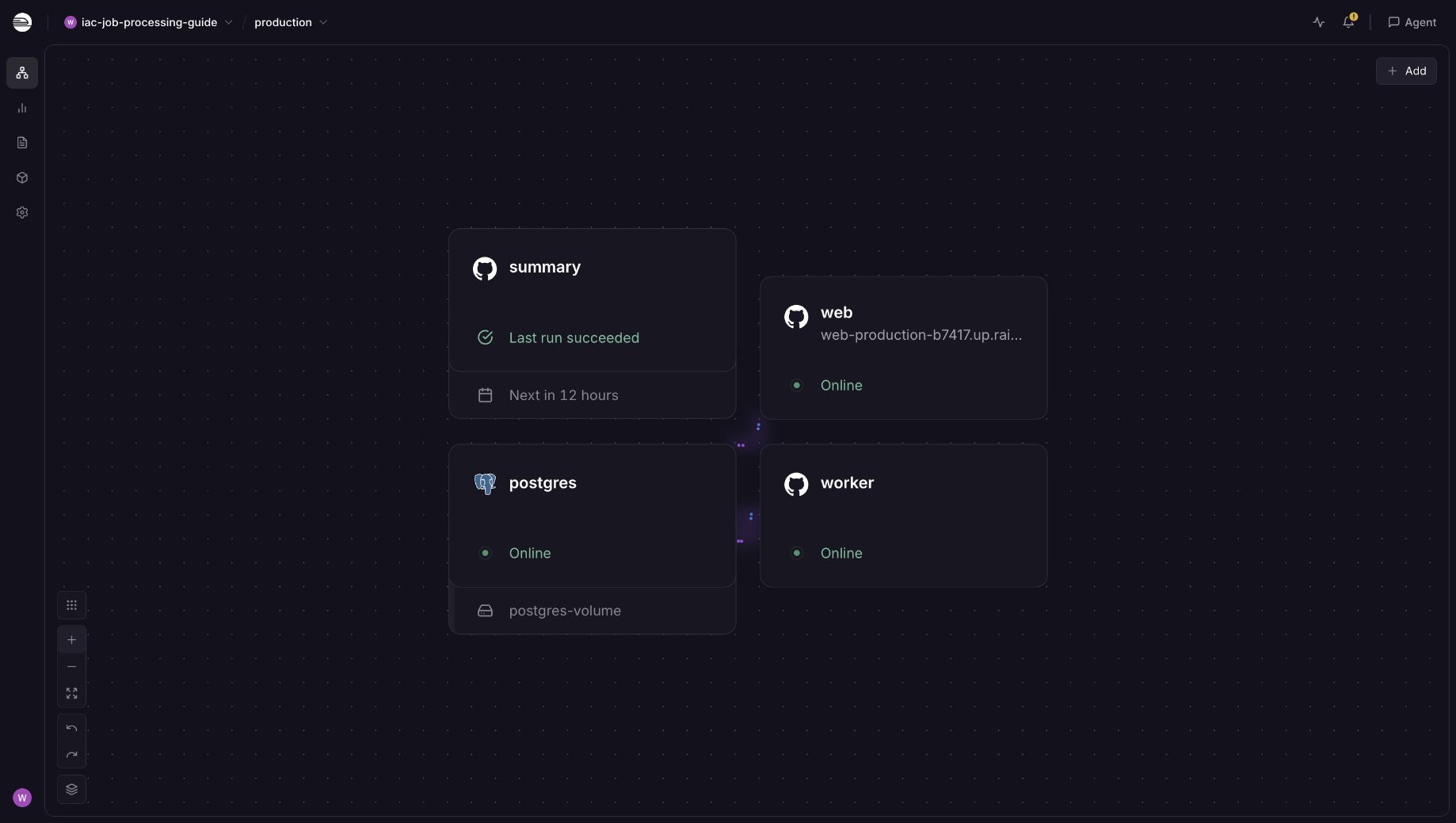
The project canvas brings the web app, worker, database, and daily summary together, with service status and the next scheduled run visible.
You can also deploy the web API, PostgreSQL, worker, and daily summary from the Railway IaC example template. It creates all four resources with their connection references, start commands, web migration, and healthcheck configured. It generates a fresh database password and requires no external API keys. Template deployment uses the captured configuration, while the repository’s IaC file lets you review and manage later changes.
How does this map to render.yaml?
The example uses the same broad application roles that you would describe in a Render Blueprint:
-
A Render
databasesentry corresponds to the PostgreSQL resource declared through Railway'spostgreshelper. -
A Render
webservice corresponds to the Railway web service, its start command, and healthcheck. -
A Render
workerservice corresponds to a Railway service running the worker entry point. -
A Render
cronservice corresponds conceptually to a Railway service configured with a cron schedule. The schedule is a service option in the infrastructure definition. -
A database connection reference serves the same purpose on both platforms: connect application services without copying credentials into their definitions.
This is a mapping of application roles, not a file conversion. The two platforms have different schemas, provisioning workflows, and database operations. Review the backup, recovery, availability, and pricing requirements of your workload separately.
Render defaults to syncing Blueprint changes when you push them, with manual sync available. Railway gives you a CLI plan/apply workflow with a saved change set that can move from review to execution. You can also use planning in CI to detect drift—differences between the configuration in Git and the environment—and reconcile it through an approved apply. Regular planning surfaces out-of-band changes so you can reconcile them with the configuration in Git.
Can railway.json or railway.toml define the whole project?
No. Those legacy files configure an individual service deployment. Project-level infrastructure belongs in Railway IaC.
The current Config as Code documentation marks railway.json and railway.toml as deprecated. It says new services cannot opt in, and existing files stop being read on December 1, 2026. Use the migration guidance in the IaC documentation for existing services rather than adding a second configuration system to the same service.
Can I use this with a monorepo or existing Railway project?
Yes. For a monorepo that owns the whole environment, keep its resources in one authoring file. Each service can have its own source settings and start command. When services live in separate repositories, you can use named partials: each repository’s IaC file has a name and manages only the resources it declares. For example, an api partial can own the API service and its database, while a web partial owns the frontend. Railway tracks that ownership and rejects attempts by one partial to manage another partial’s resources. See the ownership rules before splitting configuration across repositories.
For an existing project, import the selected environment with:
railway config pull
railway config plan
Review the import before applying anything. A complete project definition describes desired state: leaving out an existing resource can propose its removal. Keep secret values in Railway, and review the CLI's handling of preserved variables when importing.
Start with the four-resource example, review its plan, and make the infrastructure change together with the application change that needs it. As the workload grows, use Railway's production readiness guidance to add the capacity, monitoring, and recovery controls it needs.