The Best Backend Hosting for Node.js APIs, Postgres, and Workers
Backend hosting options compared for Node.js.
 Will RaphaelsonUpdated 10 min read
A typical Node.js backend has three parts: an API to handle requests, a database to store data, and a background worker to process jobs. A good backend host makes it easy to deploy all three and give each the resources it needs.
This guide is for developers choosing where to host that stack, whether you’re starting a new backend or moving beyond an API-only deployment. You’ll see how the hosting options differ, deploy a working example on Railway, and submit a job to check that the worker completes it.
Where should a Node.js API with a database and a continuously running worker live?
Railway is our recommendation for a Node.js API with Postgres and a continuously running worker. You can manage all three in one project, connect them through private networking, and deploy the API and worker independently. With usage-based billing, you pay for the CPU and memory your worker uses rather than choosing a fixed compute size.
| Platform | Best fit for this backend |
|---|---|
| Railway | API, Postgres, and worker together, with usage-based billing. |
| Render | Explicit web and background-worker services declared in a Blueprint. |
| Fly.io | Direct control over Machine sizing and regional placement. |
| Heroku | Existing applications built around dynos and add-ons. |
| DigitalOcean App Platform | Teams already running infrastructure on DigitalOcean. |
Railway is not our first choice if you need the platform to add instances automatically based on CPU or memory use: Render offers that capability on Pro workspaces and higher. Choose Fly.io if you need direct control over Machine sizes and regions.
We deployed and verified the Railway example, including a fresh deployment of its published template, on October 30, 2026. The alternative descriptions are based on provider documentation reviewed October 28, 2026. This is a functional Railway walkthrough, not a cross-platform performance or cost test.
One application, three moving parts
The companion Node.js backend uses a simple report-generation job to show how the services work together. The API accepts a list of amounts, saves a pending report in Postgres, and returns its ID. A separate worker calculates the total and stores the completed result. The client retrieves the report using that ID.
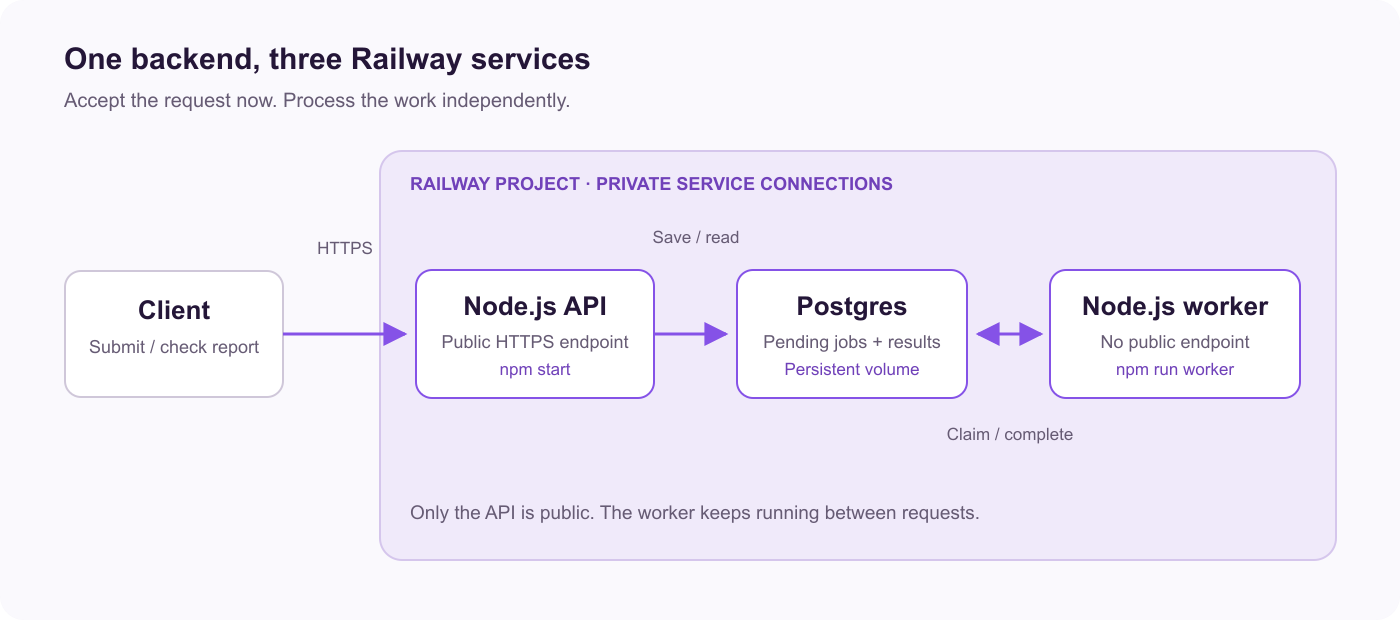
The API and worker share a repository and Dockerfile, with different start commands. Only the API needs a public address. Postgres stores both pending jobs and completed reports, keeping this example to three services.
Send amounts of 1250, 2500, and 375 cents, and the completed report should contain 4125 cents. You can use that expected total to check the result. The worker implementation and README explain how it handles transactions and retries.
We verified the published template on October 30, 2026, with API and worker commit 117bf05. The fresh deployment generated its own credentials, accepted a report with HTTP 202, and completed it with a total of 4125 cents. The check confirmed that a submitted job was processed successfully.
Before you deploy
You should be comfortable with basic Node.js applications, environment variables, and SQL tables. If Railway is new to you, start with its quick start and PostgreSQL guide. You don’t need an existing Railway deployment or database: the companion template creates the API, worker, and Postgres together.
To follow along, you’ll need:
-
A Railway account with enough plan capacity and usage allowance for three running services. Budget for the continuous worker and database as well as the API.
-
A terminal with
curlto submit and retrieve a report. -
Git and Node.js 22 or newer with npm if you want to clone the companion repository and run its automated smoke check. They aren’t required to deploy the template from your browser.
For production data, plan how you’ll recover it before accepting real jobs. Railway’s production readiness checklist covers reliability, security, monitoring, and disaster recovery. Start with private database connections, protected API credentials, backups you’ve tested restoring, and alerts for failed deployments and jobs.
Railway provides managed database capabilities, including high availability, backups, point-in-time recovery, and Postgres connection pooling. This example starts with a single Postgres service and a persistent volume; a volume preserves data across deployments but doesn’t replace a backup. Use the PostgreSQL guide to add the recovery and availability controls your production workload needs. Start by checking that you can submit and complete a job, as shown below.
Deploy the API, Postgres, and worker together on Railway
Separating the API from the worker lets HTTP requests return promptly while accepted jobs continue in the background. The template connects both processes to Postgres so the worker can pick up jobs saved by the API.
Start with the Node.js API, Postgres, and Worker template. It creates all three services, generates credentials, and configures private database connections.
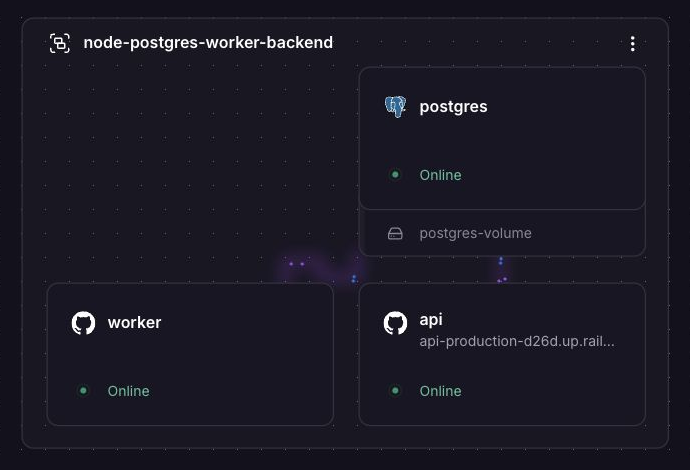
The template provisions these services in one Railway project:
-
API:
npm start, with/healthzas its deployment health check and a generated public domain on port3000. -
Worker:
npm run worker, without a public domain. -
Postgres: the shared database, backed by a persistent volume.
The template sets DATABASE_URL on both application services to ${{postgres.DATABASE_URL}}. Railway’s reference variables supply the private database connection string without putting a password in source code. The worker only connects to Postgres, so it doesn’t need a public domain.
Both processes need the jobs table before they can use the database. The API runs npm run migrate through its pre-deploy command. This runs the migration once per API deployment, before the API starts. The worker waits for the schema before processing jobs.
Keep Serverless disabled for this polling worker so it can process database jobs between HTTP requests. The example keeps the API awake too. Railway’s Serverless mode is an option for workloads that can sleep between requests.
Submit a job and check the result
This check confirms that the public API, private database connection, and background worker work together. Set API_URL to your API’s generated HTTPS address and API_TOKEN to the generated token in the API service’s Variables tab. Keep the token out of source control.
export API_URL='https://YOUR-API-DOMAIN'
# Set API_TOKEN to the value from your own API service.

curl --fail-with-body "$API_URL/reports" \
  -H "Authorization: Bearer $API_TOKEN" \
  -H 'Content-Type: application/json' \
  --data '{"amountsCents":[1250,2500,375]}'
The API returns an ID and "status":"pending". Replace REPORT_ID below with that ID:
curl --fail-with-body "$API_URL/reports/REPORT_ID" \
  -H "Authorization: Bearer $API_TOKEN"
After the worker processes it, the response contains "status":"complete" and "total_cents":"4125". Postgres’s bigint value is returned as a string. For an automated check, clone the repository, run npm ci, then run npm run smoke. It checks readiness, authentication, input validation, and a job completing with the expected total.
The repository’s Railway IaC definition keeps service commands and connection references alongside the application. See Railway Infrastructure as Code for the configuration workflow.
How the alternatives handle the same requirements
The following descriptions are based on documentation. They explain how each provider handles the API, database, migrations, and worker; we didn’t deploy the example on these platforms.
Render: explicit web and worker services in a Blueprint
Render’s Blueprint format can declare a web service, a background worker, and Postgres together. Point the application services at the same repository, give them different start commands, and supply the database connection string with a database reference. A supported API pre-deploy command can run the migration.
The background-worker service type runs continuously without receiving incoming network traffic. Render is a strong choice when the team wants explicit web and worker service types in a Blueprint, and wants horizontal autoscaling.
Fly.io: Machine and regional control
Fly.io process groups run different commands from the same application image in separate Machines. Define API and worker groups, route HTTP traffic only to the API, and keep the worker Machine running for database polling. Attach Managed Postgres, then configure the migration as a release_command.
Choose Fly.io when you want direct control over Machine size, process-group capacity, and placement. Put database-intensive workers close to Postgres: spreading application processes across regions does not automatically spread database writes across them.
Heroku and DigitalOcean: useful when the team already works there
Heroku: define web and worker process types, attach Heroku Postgres, and use the release phase for migrations. An established dyno workflow and add-on integrations are good reasons to keep an existing app there. For a continuous worker, choose a dyno type that stays running, then include both dynos and Postgres in your budget.
DigitalOcean App Platform: use a web service, a non-routable worker component, and a production database connection. A deployment job can run migrations before the application deploys. It’s a convenient choice if your team already runs infrastructure on DigitalOcean.
The tradeoffs that determine the bill and operating work
Price the API, worker, and database together. The worker’s running time, database configuration, storage, and network usage all affect the total; the API’s advertised starting price won’t tell you what the whole backend costs.
| Platform | How application compute is sized and billed | Continuous worker | Scaling controls | Database costs to check |
|---|---|---|---|---|
| Railway | Measured CPU and memory usage, with plan subscription/included usage; storage and egress also apply. | Keep running; memory is billed even while idle. | Vertical resource growth within limits; manually configured replicas. | Postgres compute, volume storage, and any additional recovery or availability resources. |
| Render | Selected compute plan for each application instance. | Paid background-worker instance. | Manual instance counts; CPU/memory autoscaling on Pro workspaces and higher. | Postgres compute/storage and selected recovery or HA configuration; applicable workspace and usage charges. |
| Fly.io | Machine size, running state, and regional rates. | Keep a worker Machine running. | Machine size/count and process-group placement; autoscaling requires an appropriate configuration. | Separate Managed Postgres plan and storage; applicable network charges. |
| Heroku | Selected dyno types and counts. | Choose a worker dyno plan for continuous operation. | Dyno size and formation counts; autoscaling availability depends on tier and process type. | Postgres add-on plan and any additional services. |
| DigitalOcean | Component size multiplied by instance count. | Running worker component. | Manual scaling on supported plans; autoscaling on dedicated-CPU plans. | Production database size/configuration; applicable transfer charges. |
Billing models and feature scope reviewed October 28, 2026. These are not equal-capacity configurations or monthly estimates. Scaling references: Railway, Render, Fly.io, and Heroku.
Railway’s advantage is flexibility: the API, worker, and database can use different amounts of resources without selecting a fixed compute package for each. An idle worker still consumes memory, even when it uses very little CPU. Use the application’s resource metrics to see what you are paying for.
Add API replicas when incoming requests need more capacity. Add worker capacity when jobs are waiting too long. Railway provides vertical autoscaling and manually configured replicas. Render’s CPU/memory targets provide another way to automate instance counts. With either approach, check how many database connections and how much load the extra processes add.
Can I run the API and worker from the same repository?
Yes. This example uses one repository and Dockerfile with different start commands. In a larger monorepo, set each service’s root and build/watch paths to match the repository layout. Railway documents both isolated and shared monorepo deployments.
The sample uses Express and listens on 0.0.0.0 at the supplied PORT. The worker is a separate Node process, so it does not depend on the API receiving requests to make progress.
Can I host this entire backend for free?
Budget for all three services, even when one provider offers a free web endpoint. Railway’s Free plan currently includes $1 of resource credit per month, which limits how much work the complete backend can do within the allowance. Check plan limits and included usage against your application.
Render’s free service types exclude background workers. Its free web services sleep after 15 minutes without inbound traffic and take about one minute to wake. Free Postgres expires 30 days after creation. Those limits matter when comparing a demonstration deployment with a backend expected to keep processing jobs. Render free-tier documentation.
What happens if the worker stops?
Accepted reports remain pending in Postgres and can be processed after a worker resumes. In this example, the calculation and completion update share a short database transaction. If you extend the worker to send email or charge a card, you’ll also need to prevent duplicate actions on retries; see the job-semantics notes before extending it.
Is Railway cheaper than Render or Fly.io?
It depends on resource use, service sizes, database requirements, and platform charges. Railway’s usage-based model is attractive for modest services. Compare usage for all three services with current provider pricing. We haven’t measured cost differences between providers.
Which platform should this app use?
Choose Railway when you want the API, Postgres, and worker together with private connections, independent application processes, and usage-based billing. Use the companion repository to see how the three services fit together and verify a completed job.
Choose Render if your team prefers Blueprints, a dedicated worker service type, and horizontal autoscaling. Choose Fly.io if you need direct control over Machine sizes and regions.
Already running this stack on Render? Railway’s Render comparison explains the platform differences, and its Render migration guide covers the move. For a new backend, deploy the three-service template, submit a report, and confirm the worker completed it before adding your own application logic.