How to Run Cron Jobs and Background Workers on Railway
Learn how to run cron jobs and background workers on Railway with simple Python examples, native scheduling, restart policies, and a ready-to-deploy template.
 Will RaphaelsonUpdated 8 min read
Some tasks run on a schedule, like generating a daily report. Others run continuously, like watching a feed for updates. Both need to run independently of whatever other activity your application has going on.
Railway gives you two straightforward ways to run that work: cron jobs for tasks that start on a schedule and exit, and persistent services for background workers that stay running. You can deploy a script, set its start command, and manage its logs and execution alongside the rest of your application. These are native Railway compute primitives.
This guide walks through both using two small Python scripts. Each checks a URL and writes the result to logs. One runs once; the other keeps going. You can use the same deployment patterns for your own tasks in other languages.
What you'll need
You'll need a Railway account, a GitHub account, and basic familiarity with running a script. For the local steps, install Python 3.13. The examples use Python's standard library, so there's nothing to install with pip.
You can follow either example independently. Both use a TARGET_URL variable, which defaults to https://example.com. Set it to a public HTTP or HTTPS endpoint you'd like to check. The result appears in logs; there's no database or web server to configure.
Choose a Railway plan with capacity for the services you want to run. A persistent worker uses resources while it's running, including between checks. The scheduled script exits after its work finishes.
The companion repository contains both scripts, the Dockerfile, local tests, and optional Railway IaC configuration.
Before putting a business task into either script, decide what a successful run means and how you'll notice failures. Put a timeout on external calls, keep credentials in service variables, and make repeated actions safe. For example, a daily report should use its date as part of its identity so rerunning the task doesn't send the same report twice. Railway's best practices and production readiness checklist cover the broader application setup.
Run a script on a schedule with Railway cron
Use cron when you want a task to run periodically: a morning status check, nightly cleanup, or a daily sync. Railway starts the service on your schedule; your script does its work and exits.
Save this as check_once.py:
"""Check a URL once; exit 0 for HTTP 2xx and 1 for a failed check."""
import logging
import os
import sys
from urllib.error import HTTPError, URLError
from urllib.request import Request, urlopen

logging.basicConfig(
    level=logging.INFO,
    format="%(asctime)s %(levelname)s %(message)s",
    stream=sys.stdout,
)


def check_url():
    target = os.environ.get("TARGET_URL", "https://example.com")
    request = Request(target, headers={"User-Agent": "railway-background-example/1.0"})
    try:
        with urlopen(request, timeout=10) as response:
            status = response.status
        if not 200 <= status < 300:
            logging.error("Check failed: HTTP %s", status)
            return False
        logging.info("Check succeeded: HTTP %s", status)
        return True
    except HTTPError as error:
        logging.error("Check failed: HTTP %s", error.code)
        error.close()
    except (URLError, TimeoutError, OSError, ValueError):
        logging.error("Check failed: connection, timeout, or invalid URL")
    return False


if __name__ == "__main__":
    raise SystemExit(0 if check_url() else 1)
Run it locally:
python3 check_once.pyThe script logs a timestamp and HTTP status. A successful check exits with code 0; a failed check exits with code 1. It follows redirects and treats a final HTTP 2xx response as success. The with block closes the response before the script exits.
The ten-second timeout limits blocking network operations. It isn't a hard deadline for an entire multi-step job; add an overall task deadline if your real workload needs one.
Deploy the scheduled script
For the quickest start, use the cron job and background worker template. It creates both services with their start commands and schedule already configured. Follow the steps below if you prefer to deploy from your own repository.
Put the scripts and this Dockerfile at the root of a GitHub repository:
FROM python:3.13-slim
WORKDIR /app
COPY check_once.py worker.py ./
ENV PYTHONUNBUFFERED=1
CMD ["python", "worker.py"]
The image includes both entry points. You'll choose which one runs in each service's settings. The default starts the worker; the cron service overrides it.
- Create a new Railway project and add a service from your GitHub repository. Name it
cron-check. - Set its start command to
python check_once.py. - In the service's Variables tab, set
TARGET_URLto your endpoint, or leave it unset to use the example default. - In Settings, set Cron Schedule to
0 9 * * *. That runs the task daily at 09:00 UTC. - Set the restart policy to Never so a failed check is recorded as a failed attempt rather than automatically restarted. Apply the service changes.
You don't need to generate a public domain: this script makes an outbound request and exits.
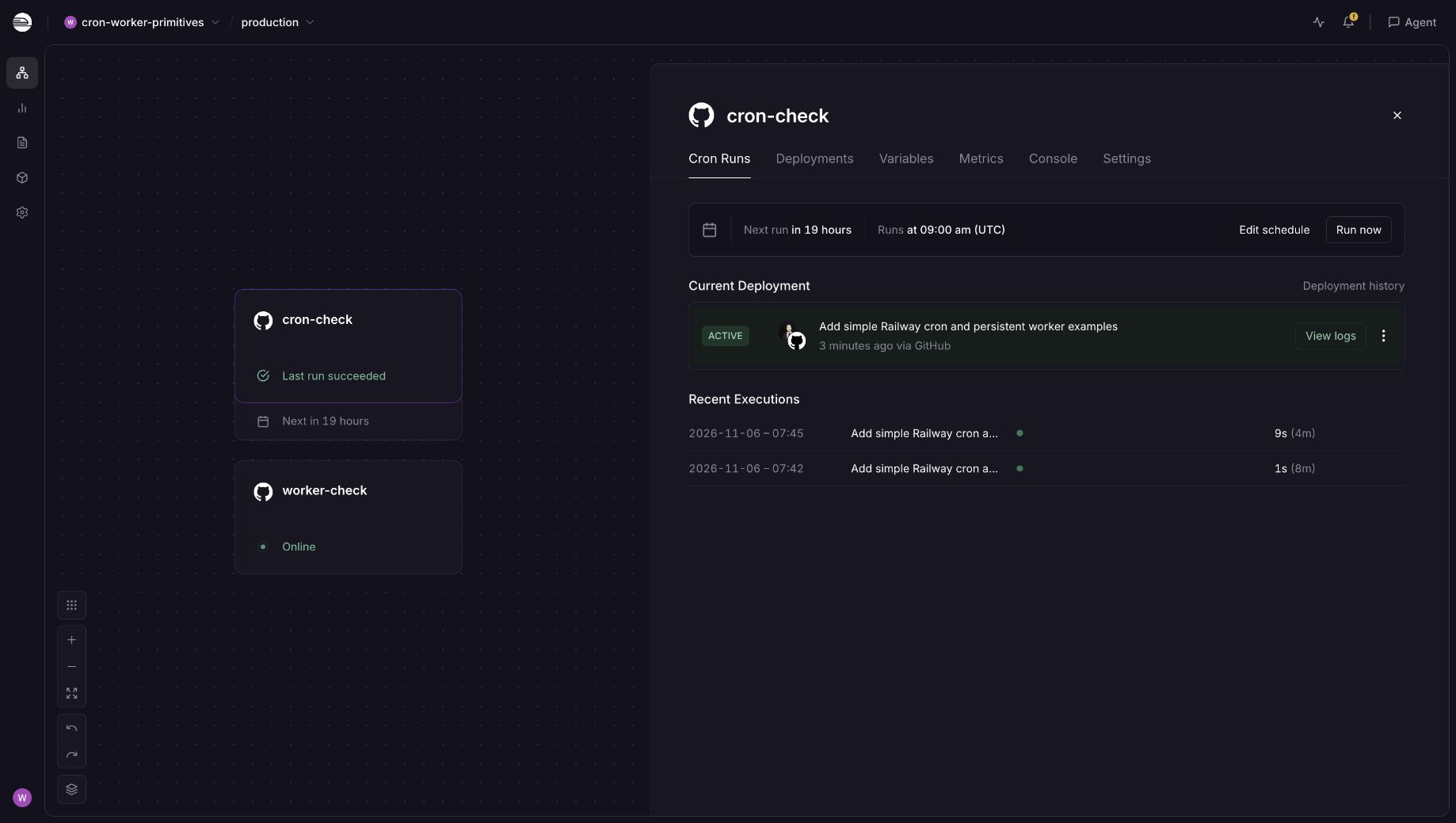
The Cron Runs tab shows the next execution and previous results. This screenshot was captured after a manual run and a temporary five-minute schedule test; the daily schedule is restored.
To try a run without waiting until morning, use the Railway CLI's cron commands. From a directory linked to your project and environment:
railway cron run --service cron-check --yes
railway cron list --service cron-check
railway logs --service cron-check --latest --lines 20
The run is enqueued asynchronously, so it can take a few minutes to appear. Inspect its status and logs after it finishes.
Make sure the task exits
Railway's native cron jobs expect the process to finish. Close database connections, network clients, and other open resources when the work is done. If the previous execution is still active, Railway skips the next scheduled execution; it doesn't automatically terminate the stuck run.
Schedules use UTC, support a minimum interval of five minutes, and can start a few minutes away from the scheduled time. They fit periodic work that tolerates that timing. Use a persistent process when you need more frequent checks, as in the next example. See Railway's cron and worker guidance for the scheduling constraints and pattern choices.
Keep a background worker running on Railway
Use a background worker when the process should stay available and keep doing work. A worker might watch a feed, poll an external API, or process tasks as they arrive.
Our worker reuses the check function. Save this as worker.py alongside check_once.py:
"""Check a URL repeatedly until the worker receives SIGTERM or SIGINT."""
import logging
import signal
from threading import Event

from check_once import check_url

stop = Event()


def request_stop(signum, frame):
    stop.set()


if __name__ == "__main__":
    signal.signal(signal.SIGTERM, request_stop)
    signal.signal(signal.SIGINT, request_stop)
    logging.info("Worker started")
    while not stop.is_set():
        check_url()
        stop.wait(60)
    logging.info("Worker stopped")
Run it locally:
python3 worker.pyIt checks immediately, then waits 60 seconds after each attempt before checking again. A failed check gets logged and the loop continues. Press Ctrl+C to stop it.
The event lets a termination signal interrupt the wait. If a request is already in progress, the worker finishes or times out that request before leaving the loop. That gives it a simple shutdown path without spinning continuously while idle.
Deploy the worker
- Add another service from the same GitHub repository to your Railway project. Name it
worker-check. - Set its start command to
python worker.py. Leave Cron Schedule empty. - Set
TARGET_URLin its Variables tab if you want to change the default. - Set the restart policy to On Failure and choose a retry limit appropriate to your workload. Keep Serverless (formerly App Sleep) disabled for this continuous worker.
- Deploy and open the service logs. Look for
Worker started, followed by successive check results.
Again, no public domain is needed. The process isn't listening for inbound requests.
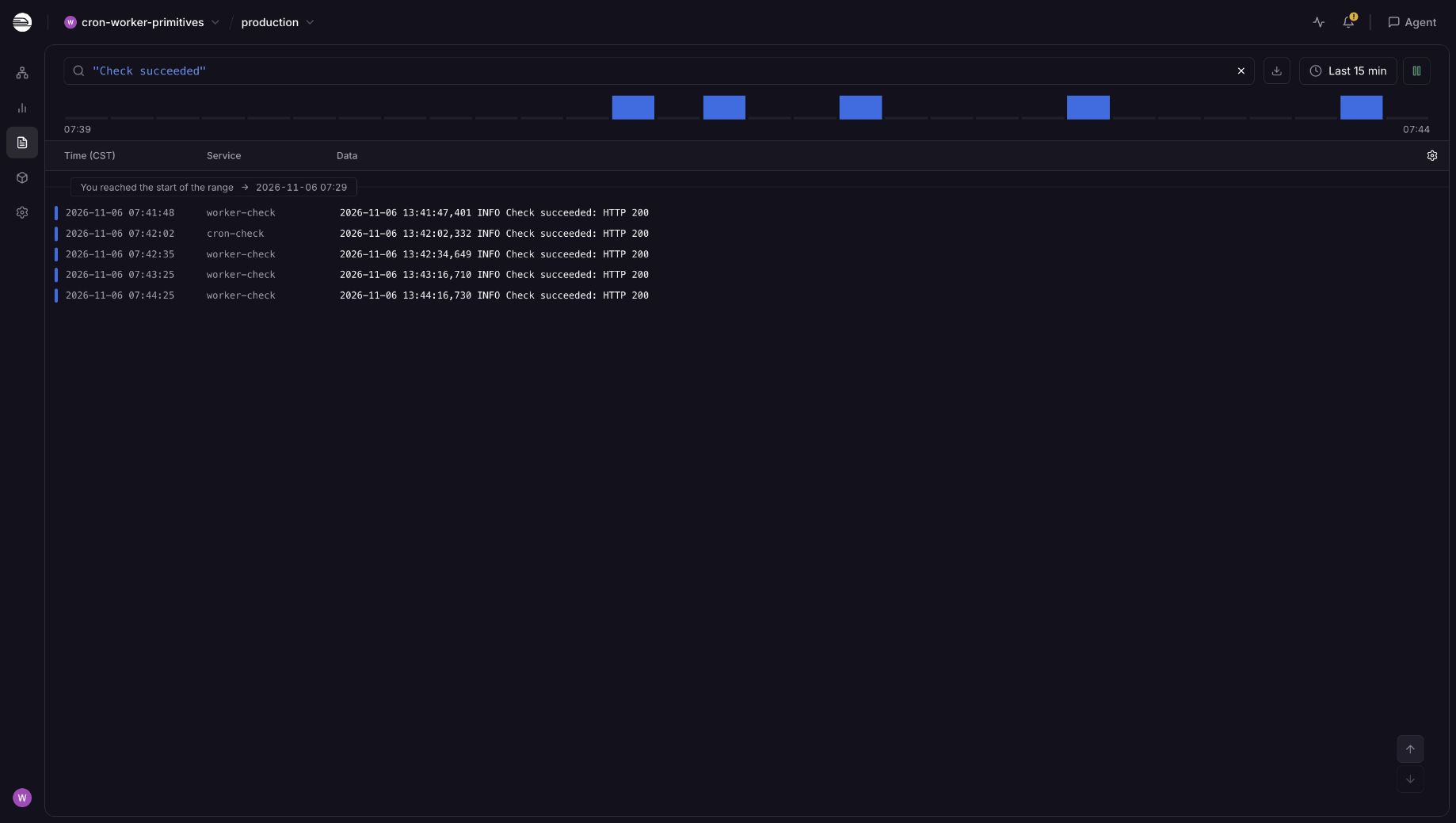
The worker continues checking between deployments; both services write their results to the same project log explorer.
Railway's restart policy controls what happens when the process stops. On Failure restarts a process that exits with an error, subject to its configured retry limit. It doesn't retry individual application tasks. In this example, a failed URL check is handled inside the loop, so it doesn't trigger a process restart.
Serverless can pause a service after inactivity and wake it when it receives traffic. This worker should keep running even when nobody visits your application, so leave it off.
Connect your worker to more services when you need them
Once your script is doing useful work, you can connect it to the rest of your application. Add Postgres when you want to read pending records or save results. Add Redis and a queue library when you need jobs to wait for a worker, retry on failure, or be shared among multiple consumers.
Those additions don't change how you deploy the worker: it still runs as a separate Railway service with its own start command. Use reference variables for connection details and private networking between services in the same project and environment. Durable queue behavior also depends on the broker's persistence configuration and your library's acknowledgment and retry settings.
You can then grow worker capacity separately from your web service. Before adding replicas to a polling script, decide how they share work; otherwise every replica may repeat the same action. For a larger architecture, see Deploy a SaaS Backend with Postgres, Workers, and Webhooks.
Frequently asked questions
Do I need Redis to run a background worker?
No. A background worker is a process that keeps running outside your application's request handling. It can poll an API or watch a feed on its own. Redis becomes useful when you choose a queue system that uses it to hold jobs.
Does a background worker need a public URL?
No. These scripts only make outbound requests and write logs. A public domain is needed when you want other systems to reach an HTTP service, not simply because a process is running on Railway.
What happens if a cron job doesn't exit?
Railway skips later scheduled executions while the previous one remains active. Close connections, bound external calls, and check run history so a stuck process doesn't leave your daily task unnoticed.
Can cron and the worker share a repository?
Yes. Create separate services from the same repository and give each its own start command. The code can be shared while schedules, variables, and restart settings belong to each service.
Deploy your first background task
Start with the execution pattern your task needs: a scheduled script that exits, or a persistent worker that keeps going. Confirm the results in Railway logs, then replace the URL check with your own work.
Deploy the Python cron job and background worker template to create both services in a new project. It includes the daily 09:00 UTC check, the persistent worker, and an optional TARGET_URL for each service. Both default to checking https://example.com, so you can inspect successful output before adapting the scripts.