The Best Hosting Platforms for Autoscaling and Cost Control
Compare Railway, Render, Fly.io, DigitalOcean, and Heroku for autoscaling and cost control. Find the best hosting platform for your workload and budget.
 Will RaphaelsonUpdated 9 min read
An application that is busy for a few hours and quiet for the rest of the day creates two different capacity problems. It needs enough room for a traffic spike, but keeping peak capacity running all month can waste money. Adding an autoscaler helps only if the platform can also release resources you no longer need and its billing model reflects that reduction.
The useful comparison is therefore bigger than “does it autoscale?” You need to know what changes automatically, what remains running, which resources are billed, and how you can control spending without compromising the application.
For developers who want to run an API or web application with changing resource demand, Railway is our first recommendation. It combines automatic vertical scaling with resource-based billing, optional idle sleep, and accessible cost controls. Render and DigitalOcean are stronger fits when your requirement is built-in, metric-driven horizontal scaling. Fly.io suits teams that want to control a pool of Machines and stop unused capacity. Heroku remains an option for applications already invested in its dyno model.
Which hosting platform should you choose for autoscaling?
These recommendations focus on managed application hosting. The criteria are scaling behavior, the resources that remain billable during quiet periods, feature requirements, and the work involved in controlling cost.
Vertical scaling changes CPU and memory available to a service. Horizontal scaling changes the number of instances. Idle sleep stops a service through quiet periods and introduces a startup step when traffic returns. The table separates those mechanisms so you can choose the behavior the application needs. Where a platform uses p95 response time, that is the time within which 95% of requests complete.
| Platform | Best fit | What can happen automatically | Billing model and requirements to check |
|---|---|---|---|
| Railway | Variable resource demand with straightforward application deployment | Vertical resource scaling; optional Serverless sleep; custom API-driven horizontal autoscaling | CPU and memory consumption, plus other used resources. Hobby is $5/month with $5 included usage; production teams should choose the appropriate plan. A custom autoscaler runs as an additional service. |
| Render | CPU- or memory-driven replica scaling | Adds and removes instances between configured minimum and maximum counts | Selected compute plan for each instance while it runs. Autoscaling requires a Pro workspace or higher; Pro is $25/month plus compute. |
| Fly.io | Traffic-driven stop/start with Machine-level control | Starts, stops, or suspends existing Machines | Running Machine size and runtime; stopped storage and other resources can still cost money. A 256 MB shared-CPU Machine is $2.19 for 30 days of continuous runtime in its lowest-priced regions. |
| DigitalOcean App Platform | Container-count scaling from CPU or HTTP demand | CPU-based or request-based horizontal autoscaling | Selected instance size and runtime. CPU-based autoscaling requires dedicated CPU; request-based scaling supports shared and dedicated CPU plans. |
| Heroku | Existing Heroku apps that need response-time-driven dyno scaling | Adjusts web dyno count against a desired p95 response time | Native autoscaling requires Performance, Private, or Shield dynos and is unavailable for Fir-generation apps. Performance-M is $250/month per dyno. |
The prices describe different configurations and feature requirements. For the underlying rates, use Railway pricing, Render's workspace pricing, Fly.io resource pricing, DigitalOcean App Platform pricing, and Heroku dyno pricing.
How does autoscaling reduce cloud costs?
Autoscaling reduces cost when a reduction in demand lets you stop paying for resources. Increasing capacity during a spike is only half of that process.
Before tuning any threshold, establish three things: the resources consumed during a quiet period, the resources needed under representative load, and the latency or throughput the application must maintain. That gives you a basis for choosing capacity and evaluating savings.
With usage-based hosting, estimate a baseline and configure the controls alongside the application. Railway provides usage alerts, compute hard limits, and per-replica resource ceilings. An alert notifies you; a resource ceiling limits available capacity; reaching a compute hard limit takes workloads offline. These controls help manage spending, with different consequences that you can choose deliberately.
1. Railway: best for resource-based scaling without instance sizing
Railway is a strong starting point when you want to deploy a conventional application and let its resource consumption vary with demand. Its scaling model provides vertical autoscaling within the applicable limits. You can also run a custom horizontal autoscaler that adjusts replicas through the API, following Railway's documented controller pattern.
The billing model makes that distinction useful. Published resource rates include $20 per vCPU-month and $10 per GB-month of RAM. You pay for consumption rather than purchasing a fixed combination of CPU and memory for every application instance. An awake service still holds memory, so reducing CPU activity alone does not remove its entire cost.
For workloads with meaningful quiet periods, optional Serverless sleep provides another way to reduce resource use. Keep a latency-sensitive production API awake; consider sleep for an intermittent tool or preview application that can accommodate startup delay. The choice lets you match the operating model to the service rather than applying the same policy everywhere.
Railway also puts resource metrics and billing explanations close to the deployment workflow. You can inspect the application's baseline, identify whether CPU or memory is driving cost, and adjust the relevant setting instead of repeatedly guessing at a larger or smaller machine size.
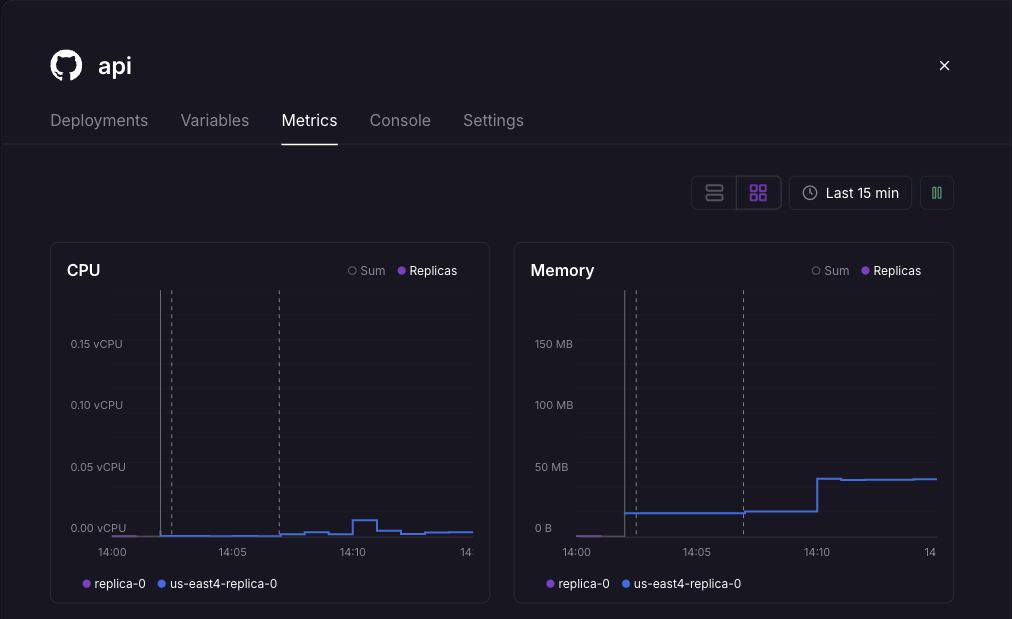
Choose Railway when the combination of managed deployment, flexible resource consumption, and visible cost controls fits the application. Its API also gives you a path to application-specific horizontal autoscaling. Render and DigitalOcean provide built-in metric-driven replica controllers if you prefer that operating model.
2. Render: best for managed CPU- and memory-based replica scaling
Render's autoscaling adjusts instance count using target CPU and/or memory utilization, bounded by your configured minimum and maximum. It is a useful option when the application scales out cleanly and the replica count should follow resource pressure.
Each running instance uses the selected compute plan. Autoscaling can reduce how long extra instances remain active, but your minimum count still establishes a running capacity floor. Include the Pro workspace subscription alongside service compute when estimating the feature's total cost.
Choose Render when this built-in replica controller is worth the workspace and instance-based model. Railway is the more direct fit when you primarily want resource consumption to vary within a service and do not need a metric-driven replica controller.
3. Fly.io: best for stopping unused Machines
Fly.io's autostop/autostart operates on existing Machines. It can start capacity when requests arrive and stop or suspend it when it is no longer needed. This is useful when you want explicit control over the Machine pool and how much of it remains running.
Stopped or suspended Machines do not incur CPU and RAM charges, but the pricing model still includes root filesystem storage, volumes, and other applicable resources. Location also affects Machine pricing. Model those charges alongside runtime when estimating the value of stopping capacity.
Choose Fly.io when the Machine lifecycle is a control you want to manage. Choose Railway when you prefer to work primarily with application services, resource consumption, and platform settings.
4. DigitalOcean App Platform: best for CPU- or request-based container scaling
DigitalOcean App Platform supports horizontal autoscaling from CPU or HTTP demand. Request-based metrics include requests per second and p95 request duration. That gives an application another scaling signal when HTTP behavior is more useful than CPU utilization alone.
CPU-based autoscaling requires a dedicated CPU plan, while request-based autoscaling supports shared and dedicated CPU plans. Vertical size changes are manual. Check the selected instance's pricing and the scaling method's requirements together rather than assuming an entry-level price includes every capability.
App Platform also documents Scale to Zero as a private-preview feature, with access requested through support. Sleeping components are billed at 10% of their standard price, and the feature cannot be combined with request-based autoscaling on the same service. Include those conditions when evaluating it for idle-cost reduction.
Choose App Platform when you want these explicit container-count policies. Railway is compelling when automatic vertical resource scaling and consumption-based billing address the cost problem with less capacity configuration.
5. Heroku: best for existing apps using eligible dyno tiers
Heroku's native autoscaler uses a desired p95 response-time target to adjust web dyno count. For an application already organized around Heroku's deployment and dyno model, that can provide a familiar path to demand-driven capacity.
The eligibility requirement changes the cost decision. Native autoscaling is available on Performance, Private, and Shield dynos, with Performance-M priced at $250/month. Fir-generation apps are not currently eligible. Budget for the minimum running dyno count as well as additional capacity during busy periods.
For a new application seeking managed deployment and flexible resource billing, start by evaluating Railway. Heroku's case is strongest when retaining an existing, eligible Heroku operating model has value for your team.
How should you compare scaling costs for your workload?
Use a typical day to separate the minimum running footprint from temporary additional capacity. For example, suppose a service needs one instance all day and a second for six hours. That is 30 instance-hours per day, or 1.25 continuously running instances. Render documents this same billing pattern.
That calculation applies to selected-instance pricing. For Railway, model CPU consumption and memory held over time instead. You can calculate a resource subtotal from the published rates, then apply the subscription's included usage and add networking, storage, and any other services. These are different billing inputs, so an instance count by itself cannot establish which platform will be cheaper.
| Cost input | Question to answer |
|---|---|
| Minimum running footprint | What must remain awake to meet availability and latency requirements? |
| Busy-period capacity | Does demand require more CPU, more memory, or more instances? |
| Quiet periods | Can capacity shrink or stop, and what remains billable? |
| Scaling eligibility | Does the needed behavior require a workspace subscription or larger compute tier? |
| Supporting services | What do databases, storage, network traffic, and monitoring add? |
Measure a representative interval before committing to aggressive scale-down or long-term capacity assumptions. The useful target is lower cost for the required successful work, with acceptable responsiveness and reliability.
Which cloud cost monitoring tools do you need?
Start with the platform's usage breakdown and resource metrics, then connect those costs to application demand. In Railway, the usage CLI can show workspace, project, and service costs, while the observability dashboard brings resource information and logs into the same workflow.
Review CPU, memory, errors, request latency, and successful work together. Low CPU with rising latency could indicate a dependency bottleneck; adding replicas in that situation may increase cost without solving the problem. A useful business measure is cost per successful request, job, or other relevant unit, compared over similar workloads.
For an application team, begin with the decisions these measurements support: remove unnecessary work, reduce a persistent memory footprint, stop suitable idle services, or add capacity where it actually improves the result.
Do you need Kubernetes autoscaling or Spot Instances to reduce cloud costs?
Neither is a prerequisite for optimizing a managed application. Kubernetes HPA controls workload replica counts using metrics. EC2 Spot Instances provide access to spare EC2 capacity with interruption considerations. They address different layers of the infrastructure decision.
If you already operate those systems, their policies and capacity choices deserve separate treatment. For a team choosing where to run a web application, first test whether Railway's deployment model, vertical scaling, optional sleep, and cost controls solve the problem without adding cluster or instance-market operations.
Start with a workload you can inspect
Deploy the Python autoscaling example on Railway to create a stateless API and a separate Python controller. The companion repository includes a bounded request runner, configurable scaling policy, and a dashboard showing responding replica identities. The template starts in observation mode; add an environment-scoped project token before enabling replica changes.
Observe the API's resource use while quiet and under a bounded request burst, then test horizontal scaling within configured bounds. Include the controller's consumption when estimating the baseline and configure the appropriate cost controls. For Docker-based workloads, the Docker deployment and scaling guide explains the corresponding Railway workflow.