How to Reduce Cloud Costs With Vertical and Horizontal Scaling on Railway
Reduce cloud costs on Railway with vertical scaling and a Python horizontal autoscaler. Follow a tested setup with cost controls and screenshots.
 Will RaphaelsonUpdated 10 min read
An application needs enough capacity for its busy periods, but keeping that capacity running all day can leave you paying for resources the workload rarely uses. The right scaling policy depends on what creates the pressure: an individual request that needs more memory, many requests arriving together, or long quiet periods between bursts.
Railway gives you a way to address each case. Vertical autoscaling lets a service use CPU and memory within its limits. Horizontal scaling adds application replicas, and a small Python controller can automate those replica changes through the Public API. You can combine the two while monitoring resource consumption and setting the cost controls that fit your availability requirements.
This guide deploys a Python application and a separate Python autoscaler. You will inspect the application's resource footprint, configure a bounded horizontal policy, send a request burst, and verify that capacity rises and then returns toward baseline.
When should you scale vertically or horizontally?
Scale vertically when one process needs more CPU or memory. Scale horizontally when independent requests or jobs can be distributed across more processes. Railway provides vertical autoscaling and configurable replicas; its horizontal-autoscaling guide demonstrates how an additional controller can automate replica changes.
| Situation | Useful starting point |
|---|---|
| One operation needs more memory | Give the service enough memory and inspect the operation's footprint. More copies do not increase one process's memory ceiling. |
| Many independent operations arrive together | Add replicas when application load justifies them, then remove excess capacity after demand subsides. |
| The service is quiet for long intervals | Consider optional Serverless sleep if startup behavior fits the workload. |
An HTTP service must work correctly across replicas. Railway's routing does not provide sticky sessions, so keep important shared state outside an individual process. The example's in-flight counters are local measurement data, not application session state.
What you need before you start
Use a Railway account and a plan with enough resources and replicas for the example. The quick start introduces deployment, and pricing explains the plan and resource charges. You need permission to create an environment-scoped project token; workspace-admin access is required for usage limits.
The supporting repository contains the application, controller, bounded request runner, tests, Dockerfile, and Railway IaC configuration. The runtime uses Python's standard library. Use Python 3.11 or newer locally for the runner and tests; the Dockerfile uses Python 3.13.
Deploy the Python autoscaling example on Railway. The template creates the API, controller, public API domain, private status link, and a fresh measurement secret. It starts in observation mode; you add a project token after deployment.
Start with the example environment. It uses one API replica for observation and one controller; choose the minimum count required by your production application's availability needs. Keep the controller at one replica. If you raise the minimum API count, set its initial count within the new bounds before enabling the controller; it holds capacity when the configuration falls outside those bounds.
1. Deploy the application and controller
The application exposes /health, a bounded /work route, and a protected /_load measurement endpoint. Its public demonstration page shows controller observations and decisions. The controller runs separately and reaches Railway's API with a token scoped to this environment.
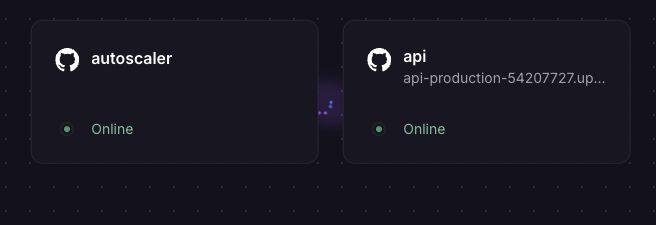
The repository's IaC configuration declares Docker builds, start commands, health checks, initial replica counts, and resource ceilings. Service reference variables connect the application and controller. Credentials belong in Railway variables, not source code.
Before automation, establish the operational baseline: a working health endpoint, graceful shutdown, appropriate state handling, and a way to inspect failures. The API keeps accepting requests briefly after a termination signal before finishing accepted work. The example pairs that handoff with 10 seconds of deployment overlap and a 20-second draining allowance. Railway's deployment teardown controls let you configure these intervals for your workload. Railway's best practices and production readiness checklist explain the wider production setup.
Open the API's public domain with /health appended. You should receive a successful response containing status: ok and the identity of the replica that answered.
2. Observe vertical resource use and set a baseline budget
Open the API's Metrics view. Record quiet-period CPU and memory, then observe the same service during a request burst. This shows resource consumption within a running replica before you change the replica count.
The example holds a small allocation while a /work request waits, making activity visible in the application measurements and resource graphs. Leave scaling in its initial observation mode for this first run. Clone the repository and send a short workload to the API you own:
git clone https://github.com/WillRaphaelson/railway-python-autoscaler.git
cd railway-python-autoscaler
python3 load.py 'https://YOUR-API.up.railway.app/work?ms=1000' --seconds 45 --concurrency 12
Use representative application work when setting production capacity. Memory may remain allocated after a burst because of application or runtime behavior, so inspect the quiet period again rather than assuming the graph will immediately return to its earlier value.
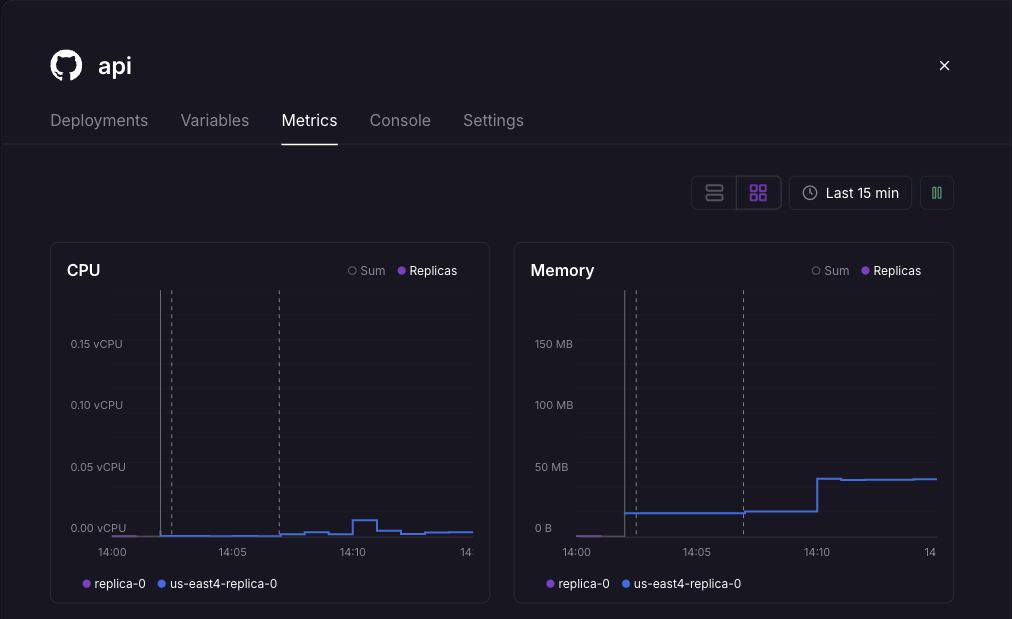
The I/O-style workload changed memory consumption more visibly than CPU. A CPU threshold alone would miss part of that activity.
Railway's published resource rates include $20 per vCPU-month and $10 per GB-month of memory. Estimate the application's footprint over quiet and busy periods, add the controller's consumption and other resources, and apply the plan's included usage. The billing guide explains why a resource saving and an invoice reduction can differ.
Configure a compute usage alert while establishing that baseline. An alert notifies you without stopping services. An optional compute hard limit takes workloads offline when reached. In the API's Settings, open Scale and find Replica Limits to set CPU and memory ceilings per replica. These are distinct cost controls, with different consequences.
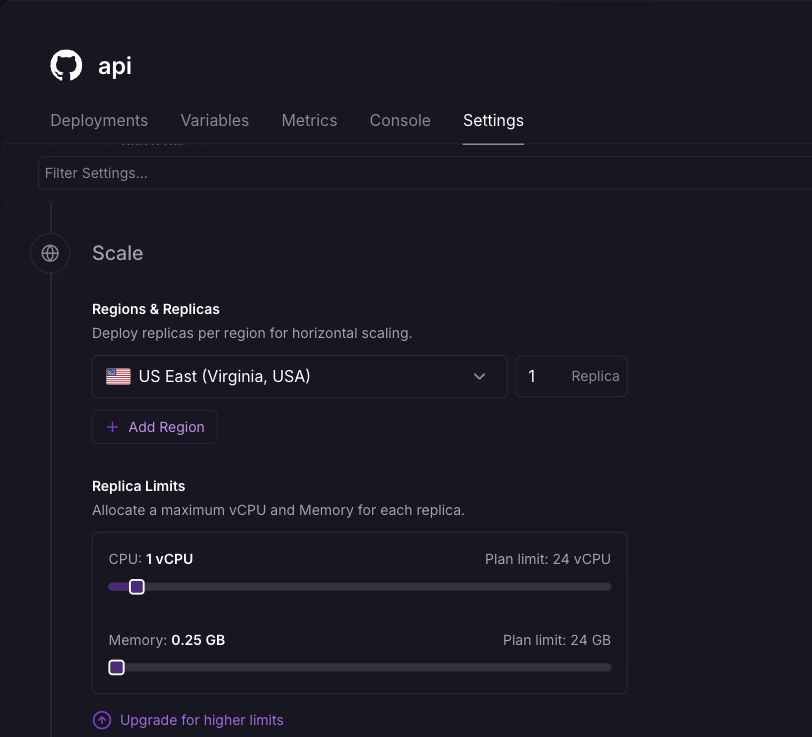
Replica count and per-replica resource ceilings are separate controls in the Scale section.
Set ceilings from the workload's needs and repeat the health and request checks after a change. A ceiling above existing consumption does not reduce usage by itself; setting it too low can crash the application. Vertical scaling gives the process room to work, while the horizontal policy below decides how many copies to run.
3. Configure the Python autoscaler's load signal
The controller samples the application's protected /_load endpoint. Each response reports one replica's in-flight requests, identity, and sample time. Health checks and measurement requests are excluded from that counter.
Requests can reach different replicas, so one response is not a complete service-wide measurement. The example takes multiple samples, estimates mean in-flight work per replica, and retains recent responding identities. Recent identities can include old and new replicas while a change settles. The controller waits for observations to match the configured count before applying another change.
For the I/O-style demonstration workload, in-flight requests are more directly useful than a universal CPU percentage. A worker application could instead use a suitable shared queue or aggregated application metric. Choose a signal that reflects the capacity problem you need to solve.
The policy code estimates a desired count and bounds it:
desired = max(p.minimum, min(p.maximum, math.ceil(current * mean_inflight / p.target_inflight)))The controller then requires sustained demand and changes one replica at a time. The default values are settings for this example, to adjust after observing your own workload:
| Setting | Example value | Purpose |
|---|---|---|
MIN_REPLICAS | 1 | Retain a baseline; choose production redundancy separately. |
MAX_REPLICAS | 3 | Bound the number of API copies, within your plan. |
TARGET_INFLIGHT | 4 | Target sampled in-flight work per replica. |
SCALE_UP_WINDOW_SECONDS | 10 | Require demand to persist before adding capacity. |
SCALE_DOWN_WINDOW_SECONDS | 60 | Wait longer before removing capacity. |
COOLDOWN_SECONDS | 30 | Allow changes and observations to settle. |
Missing or stale observations and API failures preserve capacity and reset the demand window. The controller also backs off after errors. This prevents a measurement failure from being mistaken for zero demand.
4. Add the environment token and check dry-run decisions
In the new project's settings, create a token for the deployed environment and store it as RAILWAY_API_TOKEN on the controller. The API authentication documentation distinguishes this project token from an account or workspace token. Project tokens use the Project-Access-Token header.
Confirm that TARGET_SERVICE_ID refers to the API and TARGET_LOAD_URL refers to its measurement endpoint. The generated measurement secret must match across the two services. Keep the controller's initial SCALING_ENABLED=false and DRY_RUN=true settings while checking observations.
The Python API client reads the environment's regional replica configuration and commits a targeted update through the Public API. It follows the environment-patch flow used by Railway's scaling command, with the configured target region retained. It checks that the controller itself is configured as a single replica. The update targets only the API service's existing region:
patch = {'services': {self.target: {'deploy': {
    'multiRegionConfig': {self.region: {'numReplicas': count}},
}}}}
This excerpt comes from the repository's Railway.scale method. The client checks the configured count again before writing and refuses a multi-region target, keeping this starting policy specific to one region.
Open the demonstration page and confirm that the observed and configured API counts agree. Review its policy and dry-run decisions before permitting writes.
5. Enable horizontal scaling and generate sustained load
Set SCALING_ENABLED=true and DRY_RUN=false on the controller, then deploy it. A fresh controller starts with a cooldown before applying changes.
From the cloned repository, run a longer burst against the same API:
python3 load.py 'https://YOUR-API.up.railway.app/work?ms=1000' --seconds 180 --concurrency 12The runner reports successful requests, errors, and the replica identities that served them. Follow the controller's decisions and the API's running replicas as demand persists. A successful API mutation is a requested configuration change; confirm that additional replicas respond to actual requests.
In the fresh-template test, 12 concurrent workers ran for 180 seconds and completed 2,027 requests with zero errors. The API increased from one configured replica to three, and requests reached the added replicas.
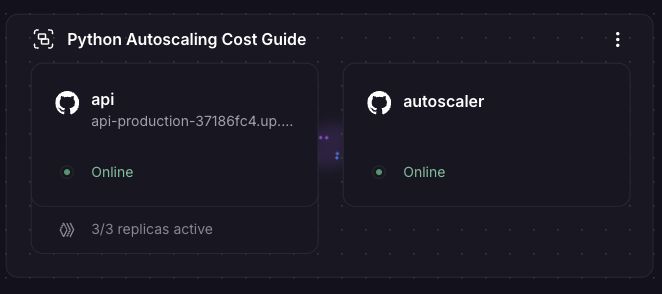
Railway confirmed three active replicas. The request runner independently recorded the identities serving the workload.
6. Verify gradual scale-down and review costs
When the bounded run ends, let the low-demand window and cooldown elapse. Watch capacity return toward the configured minimum one replica at a time. Check that the application remains healthy during the changes. Leave the page open for a few minutes after the run: each reduction needs its low-demand window and reconciliation before another begins.
The same test returned from three replicas to two, then to one after demand stopped. The controller waited for each change to settle before the next reduction.
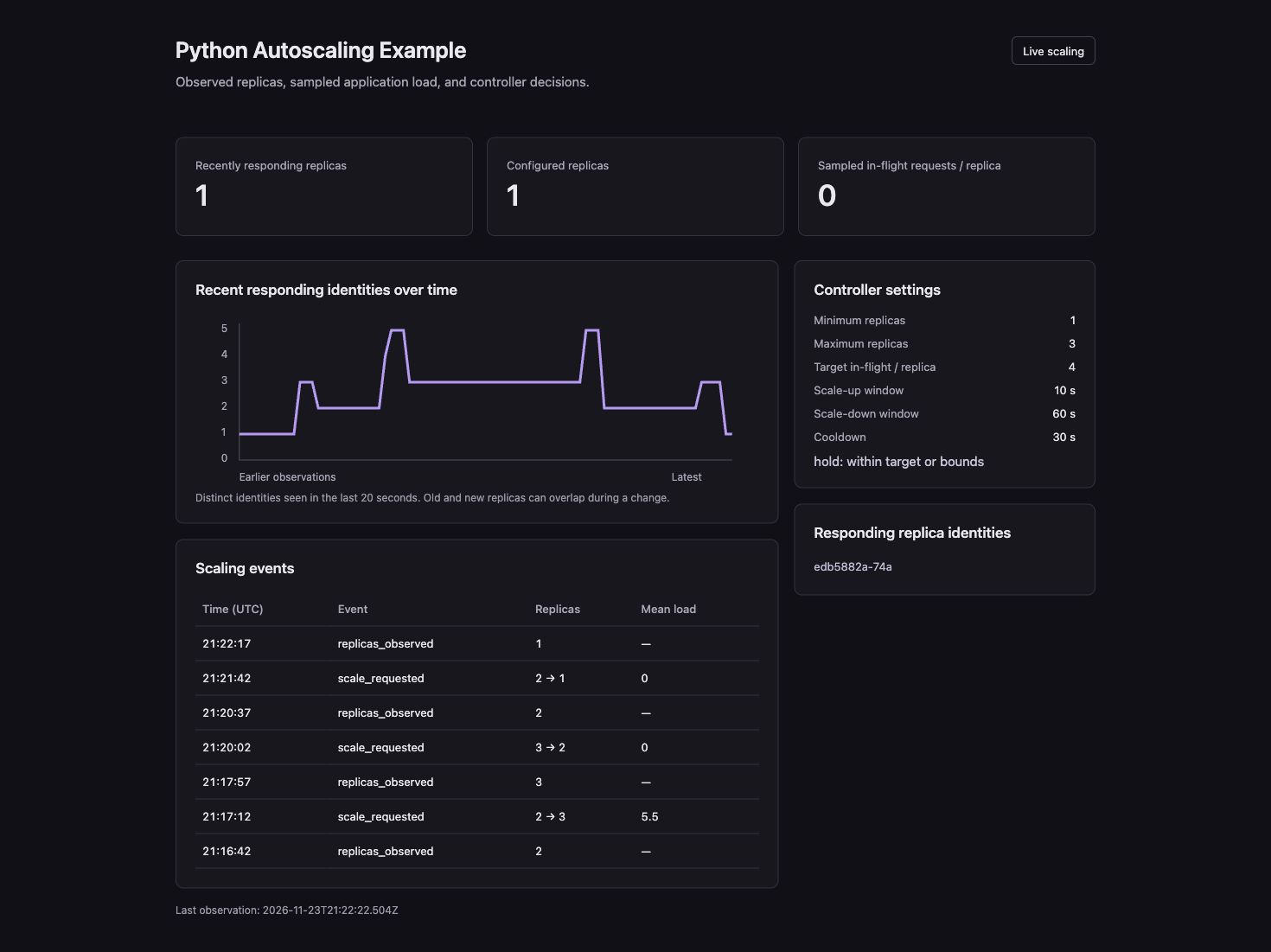
The chart counts recently responding identities, so it can include old and new replicas during a transition. The event log records the requested count and when the expected count was observed again.
Review the workspace/project usage breakdown alongside resource metrics and successful work. Include both services: the controller is continuously running, and each API replica has a memory footprint even when it is doing little work. Removing unnecessary replicas can reduce that footprint; the actual bill follows resource consumption and the applicable plan minimum.
Compare representative quiet and busy periods, rather than projecting a monthly saving from a short demonstration. Retain the minimum capacity your availability requirements demand, and keep usage alerts and suitable resource ceilings in place.
When should you use Serverless sleep instead?
Optional Serverless sleep fits workloads with meaningful idle periods and acceptable startup behavior. This continuously sampled autoscaling example leaves it disabled. Polling a service and expecting it to sleep are separate operating choices to evaluate deliberately.
For a latency-sensitive API, keep the necessary baseline awake and scale additional replicas around demand. For an intermittent tool, assess whether idle sleep provides the simpler useful policy.
How does this apply to auto scaling Docker containers?
The example runs both services from a Dockerfile. Railway provides the runtime resource scaling, while the Python controller adjusts the API's regional replica count. You can adapt that pattern to another stateless containerized application by exposing an appropriate load signal. Start with Railway's Docker deployment and scaling guide when moving an existing image or Dockerfile.
Should you use Spot Instances instead of On-Demand capacity?
EC2 Spot Instances use spare capacity that AWS can reclaim. They suit work that tolerates interruption; On-Demand instances do not carry that Spot reclamation condition. If your goal is to deploy a web application without operating EC2 capacity pools, Railway lets you focus on application resource use and replica policy instead.
What should you check if the autoscaler holds capacity?
- Check the configured environment, target service, token type, and measurement secret when observations or API calls fail.
- Wait for pending replicas to respond before interpreting a configuration update as complete.
- Keep exactly one controller replica and avoid competing manual/IaC changes while it is active.
- Inspect the application's workload and dependencies before assuming another replica will fix latency or errors.
Use the controller's explicit decision reason to distinguish a cooldown, sustained-demand window, incomplete observation, and API failure. When you finish the demonstration, stop its running deployments. The repository and template remain available for your next application-specific policy.