How to Host a Static Website With a Custom Domain
Lear how to host a static website with a custom domain.
 Will RaphaelsonUpdated 9 min read
You have a landing page, a small HTML/CSS site, or a React build ready to publish. You want it on your own domain, served over HTTPS, with updates that don't require another FTP upload. The first decision is whether you're publishing a set of files or starting something that will grow into an application.
For files alone, choose Cloudflare Pages. If the site may need an API, storage, or background processing, choose an all-in-one platform as a service (PaaS) like Railway. You can start with the frontend and add the services your application needs in the same project.
This guide covers that choice, what free plans actually include, and how to deploy a working React site with a custom domain. The Railway example also includes a private form API, so you can follow the same site from its first deployment to a saved submission.
Which kind of hosting does your site need?
A static host is enough when your site only needs HTML, CSS, images, and browser JavaScript. A brochure site, documentation site, or browser-only React app can fit that model. Cloudflare Pages is a strong choice for these workloads, with Git-connected builds and delivery through a content delivery network (CDN), which serves files from locations near visitors.
Choose Railway when the frontend is the starting point for a larger product. A waitlist might become a customer portal; a contact form might need custom validation and storage; an application might need a worker to process data in the background. Railway supports application services and background workers, plus databases, so these components can live alongside your frontend.
That gives you a concrete path forward: deploy the site, connect its API over a private network, and manage both in one project. Railway's CDN caching can serve static assets at the edge while your services handle application requests.
Cloudflare also offers Pages Functions for server-side code. The recommendation here is about your preferred operating model: static publishing when files are the whole requirement, or Railway's connected application workflow when you expect more components.
What does free hosting actually include?
Check the hosting allowance and custom-domain eligibility separately. Railway's Free plan includes $1 of recurring monthly usage credit. A workload within that allowance can cost $0. Hobby starts at $5/month toward resource usage and includes two custom domains per service. Domain registration is a separate purchase from hosting.
For Railway, estimate CPU, memory, storage, and network egress together. Service builds are free, and CDN cache hits don't consume origin compute or network egress. Use usage monitoring and budget controls to manage your baseline: email alerts notify you, resource limits constrain CPU and memory, and a compute hard limit takes workloads offline. The companion example demonstrates the workflow; it isn't a measurement showing that two services fit within $1.
The following allowances are documentation-based. Build quotas and timeout limits do not establish which host will build your site fastest.
| Provider and plan | Hosting allowance | Build limits and domain considerations |
|---|---|---|
| Railway Free/Hobby | $1 monthly Free credit; Hobby $5 toward usage; origin egress $0.05/GB | Service builds are free; custom domains require a paid plan after trial |
| Cloudflare Pages Free | Unlimited static bandwidth; 25 MiB per asset | 500 builds/month; 1 concurrent; 20-minute timeout; 100 custom domains/project |
| Netlify Free | 300 shared credits/month; 20/GB bandwidth; 2/10,000 requests | 15 credits/production deployment; 1 concurrent build; custom domains with SSL |
| GitHub Pages on Free | Soft 100 GB/month; 1 GB published site | Public repository required; soft 10 builds/hour with custom Actions exception; 10-minute deployment timeout |
| Vercel Hobby | 100 GB Fast Data Transfer; 1 million CDN requests | 45-minute build timeout; personal/non-commercial restriction |
| Render Hobby static site | 5 GB/month workspace outbound bandwidth; then $0.15/GB | 500 Starter pipeline minutes/month |
| DigitalOcean App Platform Free | 3 static-only apps; 1 GiB outbound/app; then $0.02/GiB | 1-hour build timeout |
Netlify's credit model introduced in 2025 means deploys and traffic draw from the same allowance. Ten production deploys, 5 GB of bandwidth, and 100,000 requests consume 270 credits before other metered features. Exhausting Free credits pauses the team's projects until refresh or upgrade; legacy accounts can have different terms.
Commercial-use rules matter too. Vercel Hobby is restricted to personal or non-commercial use. GitHub Pages restricts online-business, transaction-oriented, and SaaS hosting. A free domain connection alone doesn't make either suitable for every business site.
Finally, distinguish static delivery from backend sleep. Render static sites use a CDN; its free web services sleep after 15 idle minutes and take about a minute to restart. On Railway, you can keep the origin running or enable optional Serverless to reduce idle compute use, accepting a wake-up delay or initial error. Choose that behavior based on the application requests your site needs to serve.
How do you deploy from GitHub and connect your domain?
Deploy the site to its generated address first, check the build and routes, then attach your custom domain. Railway automates builds and deployment from GitHub, so the same workflow can publish both your frontend and its API.
For the example below, you need a Railway account with available hosting resources. To use your own domain after the trial, choose a plan that supports it and have access to the domain's DNS settings. You don't need an existing deployment or email-provider credentials. Before using the example for real leads, review Railway's production readiness checklist, including storage protection and application health.
Start with the working example
Deploy the React contact form and private API template. It creates a public frontend, a private API, and a persistent messages volume. We verified a fresh deployment of the published template, including valid and invalid form submissions.
The supporting repository separates the two services:
frontend/   React source, built files, and the public web server
api/        Submission validation and saved-message storage
The frontend receives browser requests. Its server serves the built files and forwards form submissions to the API over Railway's private network. The API has no public domain. This is the application setup you can extend as the site's needs grow.
Configure the repository and build
For your own GitHub-backed project, connect a GitHub account with contributor access to the repository and select the branch each service should deploy. Railway autodeploys publish new commits pushed to that branch.
In the companion project, the frontend's service root is /frontend, its build command is npm run build, and its start command is npm start. The Vite build creates dist/; the start script runs the server that serves those files. The API uses /api and starts with npm start. The repository's tested Railway IaC records those settings and the private API reference. See the monorepo guide when your repository contains multiple services.
Railpack turns the source into a container image. You can also use a Dockerfile when you want to define the build yourself.
On a static host such as Cloudflare Pages, you instead configure the build command and output directory to publish. Its Git setup supports public and private repositories. Plain HTML/CSS can be published without adding a compilation step.
Test the generated address
Open the frontend's generated URL and visit /contact directly. Check that JavaScript, CSS, and images load, then refresh that nested route. A single-page React app needs the host to return the app for client-side routes rather than treating every route as a missing file.
The companion server implements that fallback. Cloudflare Pages supplies it automatically when there's no top-level 404.html. The required setting depends on your host; copying a rewrite rule from another provider isn't a substitute for testing.
You can also enable Railway's CDN caching for the frontend. In our example, requests for one built JavaScript asset returned x-cache: MISS, then x-cache: HIT, confirming that the asset was served from cache.
Attach your domain and verify HTTPS
In the Railway web service's settings, add the custom domain under Public Networking. Create both records Railway provides: the routing CNAME and the TXT record that verifies ownership. Follow the exact values shown for your service. Railway's domain guide covers DNS setup and automatic SSL provisioning.
After verification, open the custom hostname over HTTPS and repeat the route and asset checks. Keep the API private; the browser reaches it through the frontend's submission endpoint.
For Cloudflare Pages, add the hostname in Pages before changing DNS. An apex domain such as example.com requires Cloudflare nameservers. A subdomain such as www.example.com can use an external DNS provider with a CNAME.
Once production works, add previews to review changes before publishing them. Railway PR environments create temporary application environments and remove them when PRs merge or close; their services consume hosting resources. Cloudflare's Git integration creates branch and PR preview URLs, within the build allowance.
How do you add forms or a backend to a React site?
Use a managed form service when you need a standard submission workflow. Use an API when the form needs application-specific validation, storage, or processing. Railway's advantage here is that you can extend the project you already deployed.
Open /contact on the example's frontend and submit fictional details. The React handler sends the fields to the frontend's submission endpoint:
const response = await fetch('/api/contact', {
  method: 'POST',
  headers: { 'Content-Type': 'application/json' },
  body: JSON.stringify(Object.fromEntries(new FormData(form))),
});
The frontend forwards the request to the private API, which validates the fields and saves the message to its mounted volume before returning a reference. The browser then displays confirmation.
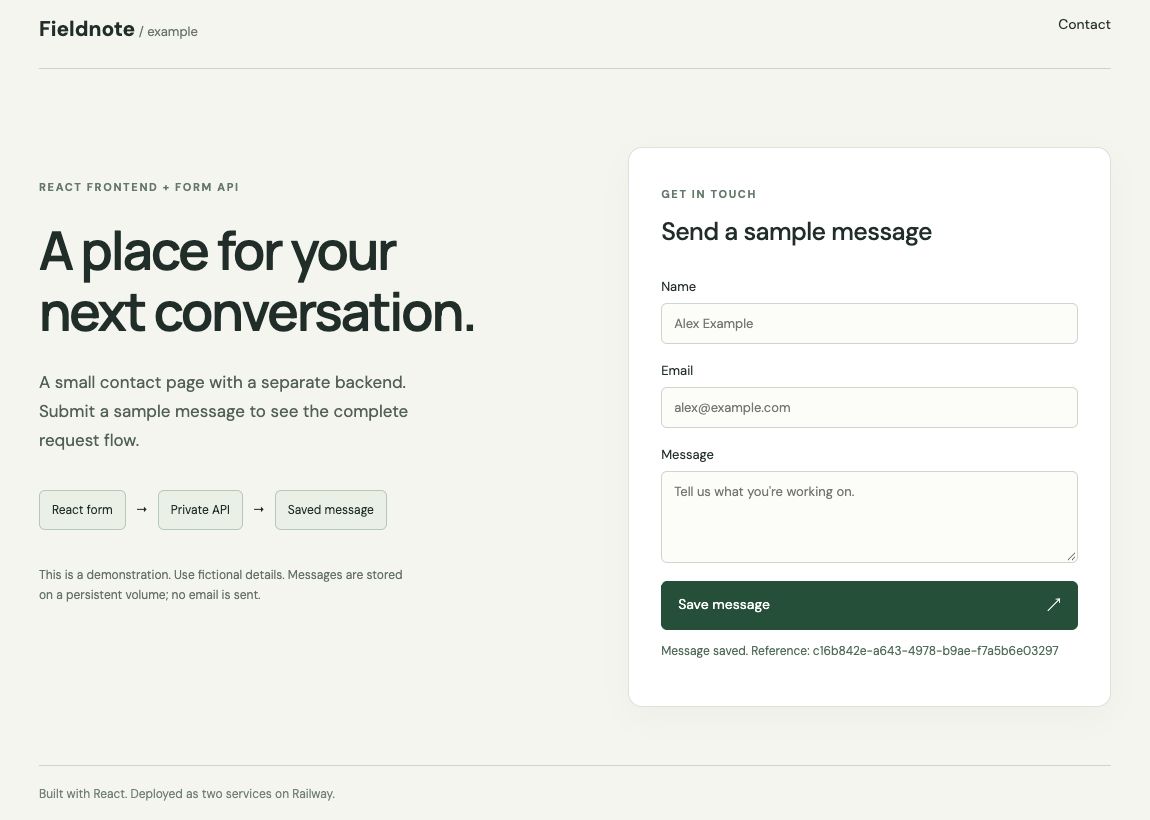
That confirmation means the message was stored; the example doesn't send email. For a team inbox, add an email integration or a database-backed workflow. The repository explains the example's single-replica storage and basic abuse controls. Before collecting real contact details, add appropriate retention rules, stronger bot protection, and backups using Railway's best practices.
If a managed form inbox covers your requirement, Netlify Forms is another route. It detects forms in deployed HTML, so browser-rendered React forms need matching static HTML for detection. Its current credit-plan rules include free, unlimited submissions, while site traffic and production deploys still consume credits. An external form service or a Pages Function can also process submissions for a static frontend; check that service's own allowance.
How do you move an existing site without losing its URLs or email settings?
Stage and test the new deployment before changing live DNS. The deployment workflow above still applies; migration adds the need to preserve existing behavior and keep a rollback path.
-
Inventory files and dependencies. Copy HTML, CSS, JavaScript, and images, and list existing URLs, redirects, form handlers, databases, and email settings. Publishing static files doesn’t set up PHP execution or transfer email accounts and mailboxes.
-
Publish a staged copy. Upload the files or connect the repository, then test assets, links, redirects, and forms at the generated address. For a generated site, publish the build output.
-
Prepare the domain change. Add the custom hostname in the new host and preserve unrelated DNS records, especially those used for email. Change nameservers only when required or when intentionally moving DNS hosting.
-
Cut over and verify. Apply the required DNS changes, confirm certificate readiness, and test the production hostname. Keep the old service available while caches update and until the new site works.
Certificate validation may depend on the new DNS configuration, so the exact order varies by host. Use the domain instructions linked above and avoid retiring the old host prematurely. No migration downtime benchmark was performed for this guide.
For a site with a backend, use this move to bring the frontend and application services into one Railway project. You can retain the Git-connected deployment workflow as you add functionality, rather than choosing a second operating model when the first static page becomes an application.